Comparing the contents of two deployments
On the Deployments page, use the Compare Deployment action to compare the contents of two deployments.
A deployment consists of a single version of a packaged component that has been deployed to a specified environment. This comparison provides an historical view of deployments over time.
Procedure
-
On the Deployments page, click the
 Actions menu for a deployed package and select View Deployment History.
The Deployment History panel is displayed.
-
In the
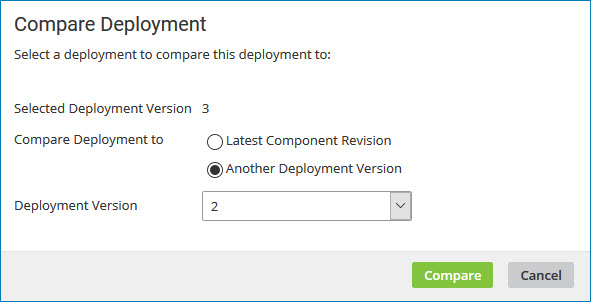
Actions menu for a deployment, select Compare Deployment.The Compare Deployment dialog opens with the selected version in the Selected Deployment Version field.
-
In the Compare Deployment to field do one of the following:
- Select Latest Component Revision.
- Select Another Deployment Version and select a version number from the drop-down list.
-
Click Compare.
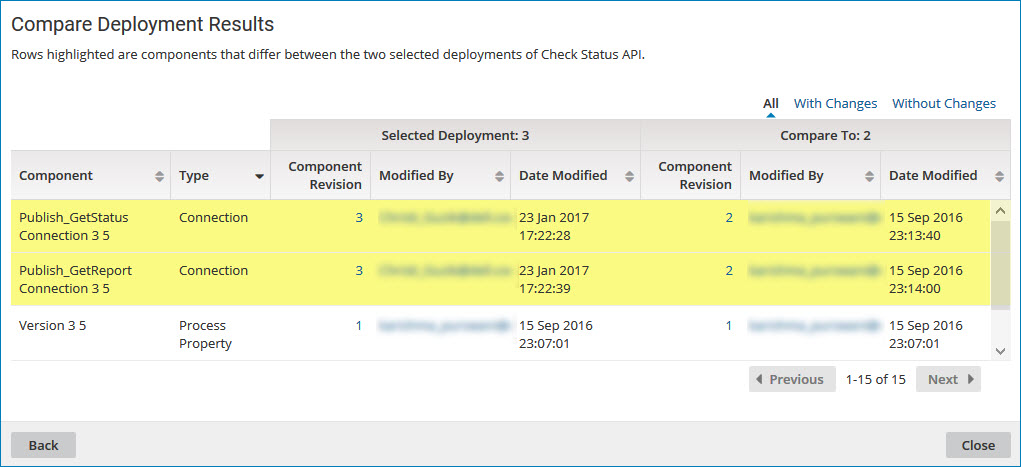
The comparison results are displayed. Differences between the two deployment versions are highlighted.
-
To contact the user who last modified a specific component within either version of the deployment, click the email address in the Modified By field.
Your email application opens with the user's name in the To field of a new message.
-
To select a different version with which to compare, click Back and repeat steps 3 and 4.
-
When you are done comparing the two deployment versions, click Close.
