Platform Release Notes for November 2025

- You can now use the Secrets Management service for runtimes hosted on Boomi's Managed Cloud Services. Google's Cloud Platform (GCP) was also added as another secrets manager option. (PS-9453).
Refer to Boomi Secrets Management Service to learn more.
- You can enable the Platform’s new navigation bar by going to Settings > Preferences > Early Access Features and enabling Navigation 2.0. The new navigation includes additional tools and access to AI search, which uses Boomi’s Help documentation and Community articles to provide answers to your questions. (UU-15129)
Refer to the Preferences page
-
AI summaries powered by Boomi Answers are now available at the top of your search results in Help.boomi.com and Developer.boomi.com. These summaries provide quick and relevant answers to help you learn, troubleshoot, and take action in the Boomi Platform. AI summaries appear when you log into the Platform and have AI enabled on your account. While you are signed in, Help and Developer docs are embedded in the Platform.
If you enable Global Navigation 2.0 and Search in Settings > Preferences in the Platform, you can search and access documentation in a side panel. This side panel enables you to search and find answers without leaving your workspace. To access the side panel, click the search icon located at the top right corner of your screen. (UU-16609, UU-15169, 16608, 15570)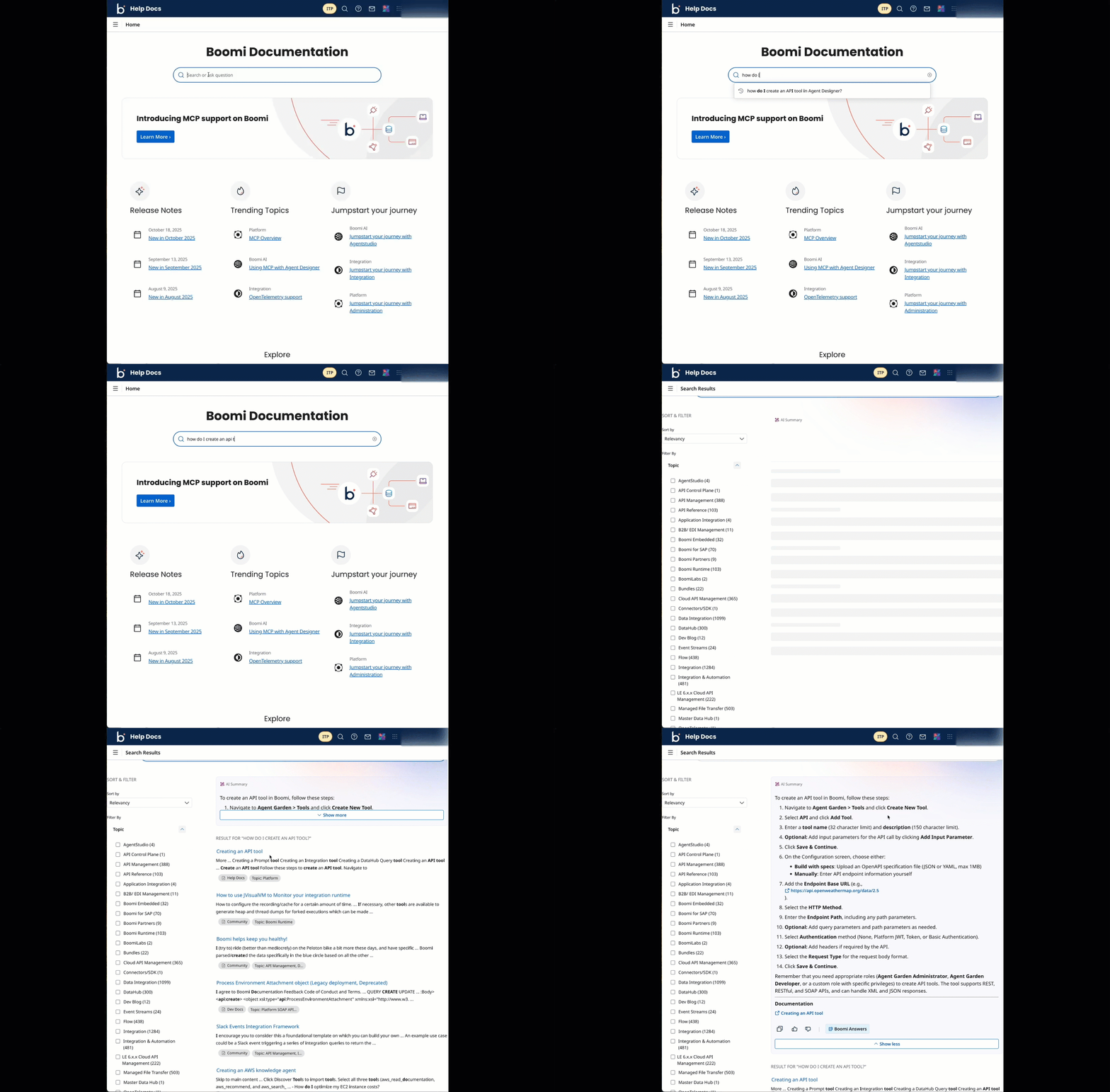
-
The following dashboards are now available on the Usage page to improve visibility, control, and service-specific insights:
- Agentstudio - Displays data consumption specific to Agentstudio, providing better support for monitoring and understanding usage. (UU-16010)
- APIM - Provides better visibility into API Management usage, including API Control Plane and Cloud API Management data. (UU-14411, UU-15812, UU-14991)
- Task Automation - Introduces a dedicated view to monitor and manage automated tasks and workflows across the platform. (UU-13724)
- Data Management - Displays a consolidated view of data usage, storage, and access across multiple services. (UU-13723)
These dashboards support different versions based on user subscription level and implement user-specific data visibility, allowing you to view metrics tied to your own activity rather than account-wide aggregates. Additionally, the All Services dashboard layout and navigation are updated to accommodate the new dashboards and improve usability. (UU-13144)
Refer to Licensing and Usage to learn more.
- You can enable a banner to display at the top of the platform that includes your account name, account ID, email ID, and a button to switch accounts. This helps you to easily identify your active account and switch between accounts. To view this banner, click your account name in the top right corner and toggle Account Banner. (UU-13777)
- All new users receive a questionnaire upon sign-up to help personalize the Platform experience. (UU-15998)
- Eligible Legacy Platform User accounts are migrating to to Unified Login; no user action is needed at this time. (PS-9885)
