Platform Release Notes for July 2026

-
The vault service for Boomi's Key Management Service is changing from HashiCorp Vault to AWS. Existing Platform accounts using Boomi’s HashiCorp Vault KMS will work as normal. Boomi will contact you with more details about this migration. (PS-7091)
Refer to Boomi Key Management Service to learn more.
-
Updated platform links across the Welcome page, Resource Center, masthead, and footer to point to the new ServiceNow-powered Community, Support, and Training applications. (UU-19171, UU-19172)
-
Added Knowledge Hub to the platform service menu. (UU-19572)
-
Replaced Spaces with Marketplace Publisher in the Boomi Labs service menu. (UU-19799)
-
The Boomi Documentation YouTube channel is now live. Learn at your own pace with video tutorials, product walkthroughs, and demos about the Boomi Enterprise Platform. Visit and subscribe to the Boomi Documentation YouTube channel to stay up to date with the latest content.
-
The help.boomi.com home page has been redesigned to help you discover documentation based on your goals and business outcomes. New users can quickly get started with dedicated quickstart guides, use cases, and examples. Featured videos from the Boomi Documentation YouTube channel make learning easier through product walkthroughs and tutorials.
-
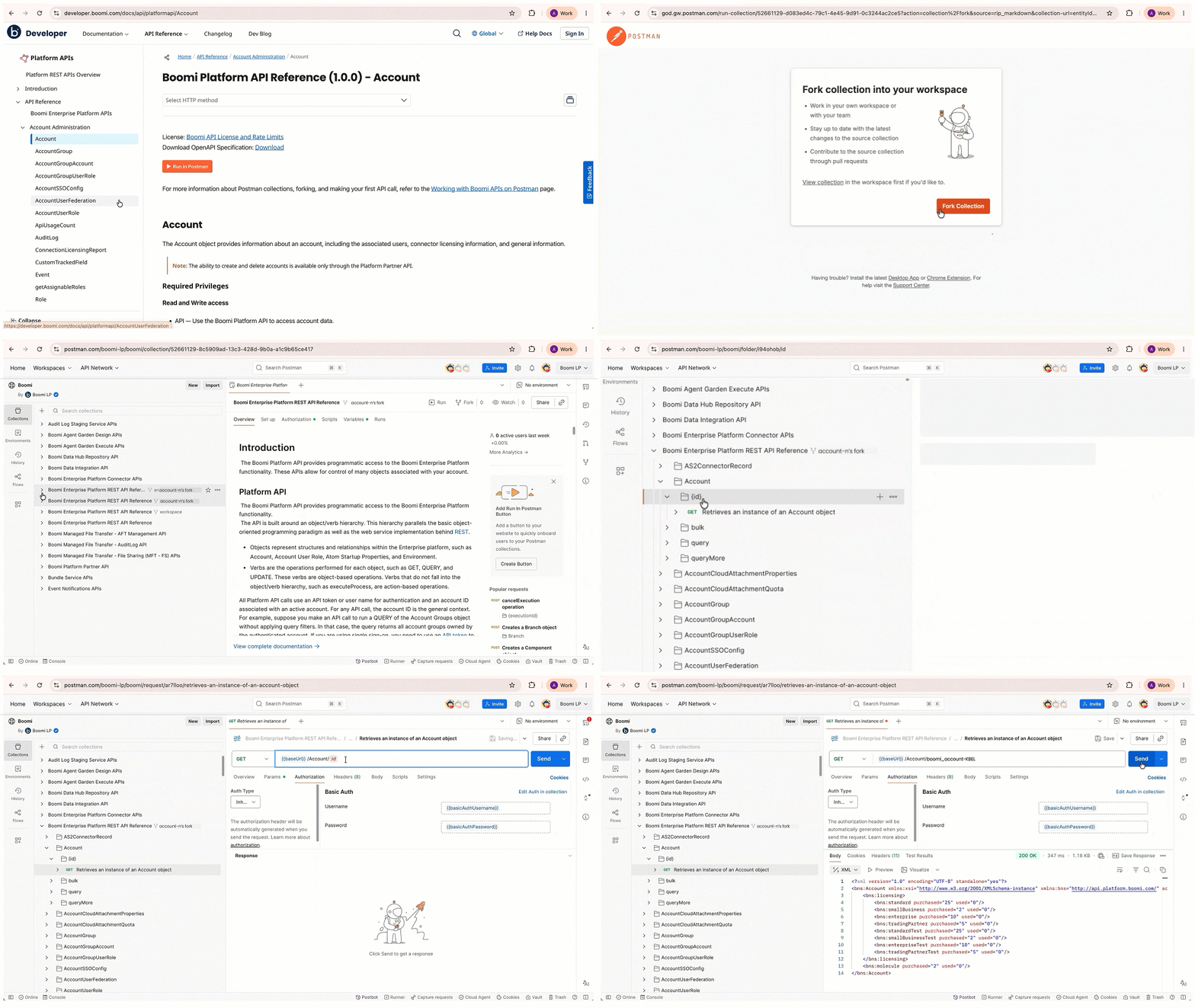
Boomi REST API collections are now available in Boomi's public Postman workspace. Fork any collection directly from the Run in Postman links on the API Overview and API reference topics in the Boomi Developer Documentation. Configure authentication and variables in your forked collection to start sending requests to Boomi endpoints.
Refer to Working with Boomi APIs on Postman to learn more.
-
Updated the Two-factor Authentication page UI in preparation for the eventual enforcement of Multi-Factor Authentication for all new accounts. Partner accounts are not affected by this change.
- Email-based authentication: You can now use your registered email as your MFA verification method in addition to a time-based one-time password (TOTP) authenticator app. When you enroll in MFA, you choose between receiving a one-time code to your registered email address or using an authenticator app to generate a code. You can switch authentication methods without un-enrolling from MFA at any time. Also, the option to disable MFA is removed from the Authentication page UI. (PS-12330)
Refer to Two-factor Authentication to learn more.
-
The Licensing & Usage page includes a Multiplan View for accounts with more than one active plan. Instead of landing on a single plan's dashboard, you see a summary page listing all your active plans as individual cards. Each card shows the plan name, edition, tier (where applicable), capacity used versus total, a usage progress bar, and forecast status. Cards are color-coded: green for on track, amber for at risk, or red for over capacity. You can select View Detail on any card to open that plan's full usage dashboard. (ONE-699) (ONE-685)
Refer to the Usage tab to learn more.
Boomi Orchestrate
Orchestrate is an Early Access release available on the North America Platform. Sign up to access Orchestrate.
- Boomi Orchestrate now automatically generates a Solution View that organizes solution assets into architectural layers based on the intent, context, and relationships within your solution. This view maps assets across seven canonical layers: ingestion, reasoning, normalization, logic and state, intervention, resiliency, and optimization. It shows how data flows and why each asset exists.
The Solution View updates automatically as your solution evolves, keeping your architectural representation up to date.
Refer to Navigating the solution view (AGCT-5929) to learn more.
Boomi Connect
-
Introduced 29 new MCP connectors: Acuity Scheduling, Airtable (Personal Access Token), Bland AI, BoldSign, Bonusly, Brevo, Canny, Clari, Google Text-to-Speech, Gumroad, Heap, Microsoft Planner, MongoDB Atlas, Mural, NetSuite, Outreach, Ping Identity (PingOne), PostHog, Refiner, Salesloft, Smartsheet, SQL Server, Stack Exchange, Teamwork, Timely, Tradeshift, Typefully, Workday, and Zoom Standard. Refer to Connect overview for more information.
-
Added an MCP registry that lists available MCP servers, so you no longer need to construct server URLs manually. (AUTOMATE-2523)
-
Added support to set up Microsoft Entra ID and Auth0 as identity providers (IdPs). Refer to Creating identity providers in Boomi Connect for more information. (AUTOMATE-2998)
