Preparing your Kubernetes cluster for Flex Runtime
Boomi Flex Runtime is part of Boomi's Early Access program, which offers beta versions of Boomi innovations on an "as is" basis, with no warranties. These features are not final production releases, are unsupported under Boomi's service agreements and support services, and are not intended for production use. While Boomi will work to address issues encountered during the preview and welcomes participant feedback, any feedback provided — whether ideas, suggestions, code, or recommendations, oral or written — is irrevocably assigned to Boomi, LP. By participating, you confirm you have the authority to provide that feedback, will not assert any intellectual property claims against Boomi, and that Boomi may freely implement it without violating any party's rights. If a beta feature doesn't meet Boomi's standards or raises significant concerns, it may never reach general availability, and Boomi cannot guarantee any particular innovation will be released in a supported form. Note that some innovations may only be available as open source or for specific runtime configurations. Documentation may be provided as PDFs, online, or on Community forums.
Refer to the Early Access page to view current programs and request Early Access for a specific feature.
Before installing a Flex Runtime, prepare your Kubernetes cluster as detailed below, so it meets all of the requirements.
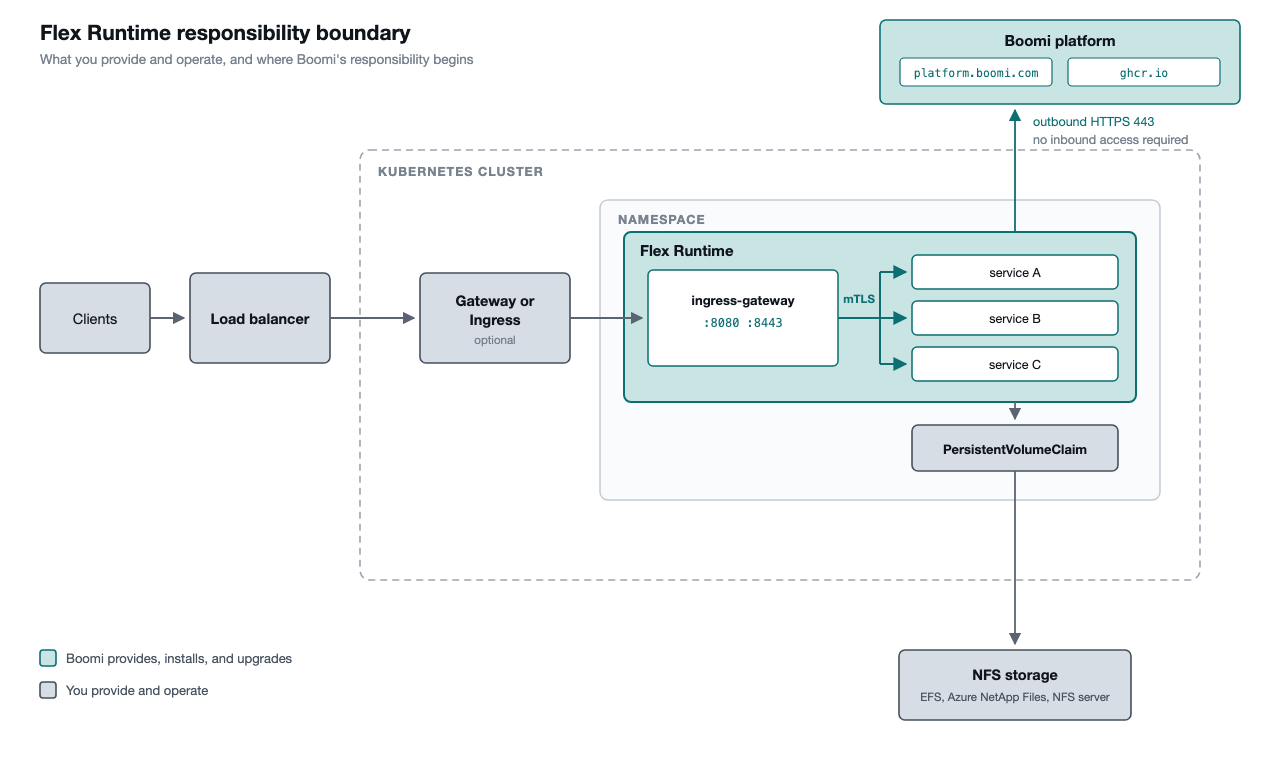
Step 1. Create a Kubernetes cluster
Flex Runtime runs on any conformant Kubernetes distribution: managed Kubernetes from any cloud provider, or self-managed, including bare metal. Nothing in the runtime is tied to a specific cloud.
| Requirement | Value |
|---|---|
| Kubernetes version | Latest stable release |
| Node architecture | linux/amd64 or linux/arm64 |
| Storage | Network File System |
Step 2. Create a namespace
Each runtime occupies its own namespace and is the only runtime in it. Several of the resources a runtime creates are named the same in every installation, so two runtimes in one namespace would collide. For more than one runtime, create a namespace per runtime and repeat these steps.
kubectl create namespace <name>
Step 3. Create the storage volume and claim
The runtime keeps all of its state on a single persistent volume claim. Several pods mount it simultaneously, potentially across nodes.
| Property | Value |
|---|---|
| Access mode | ReadWriteMany |
| Ownership | Writable by UID 1000 and GID 1000 |
| Claim name | Any name must match what is entered in the Runtime Management UI |
Create both the PersistentVolume and the PersistentVolumeClaim resources in the runtime's namespace. The runtime only ever sees the claim.
The provisioning of the volume is specific to your cloud vendor, so follow your vendor's documentation:
| Platform | Documentation |
|---|---|
| AWS | Amazon EFS CSI driver |
| Azure | Azure NetApp Files with AKS |
| Other | Any CSI driver or static PersistentVolume definition that provides ReadWriteMany over NFS |
The runtime's pods run as a non-root user UID 1000, and the volume must be writable by that user.
Step 4. Allow outbound network access
The cluster needs outbound HTTPS on port 443 to:
| Destination | Purpose |
|---|---|
| platform.boomi.com | Runtime registration, configuration, and lifecycle commands |
| ghcr.io | Pulling runtime and workload images |
Images are publicly available at https://github.com/OfficialBoomi/. No registry credentials or image pull secret is required.
Step 5. Inbound traffic to the runtime
The runtime creates a Kubernetes Service named ingress-gateway in its namespace. It is of type ClusterIP, and it is the single entry point for all traffic into the runtime from outside. It listens on two ports:
| Port | Protocol |
|---|---|
| 8080 | HTTP, plaintext only |
| 8443 | HTTPS, TLS only |
5a. Choose how traffic reaches the Service
Any standard Kubernetes routing mechanism works. Pick whichever matches what the cluster already does for other applications, and follow that implementation's documentation:
| Option | Documentation |
|---|---|
| Gateway API | Recommended. Upstream Kubernetes APIs, portable across vendors. Only the GatewayClass behind them is vendor-specific. Gateway API |
| AWS | AWS Load Balancer Controller for EKS |
| Azure | Application Gateway for Containers |
| Other | Any Ingress controller or load balancer integration |
Each of these routes to the same destination, the ingress-gateway Service in the runtime's namespace, and all traffic bound for the runtime should be directed there. The gateway performs its own routing onward, matching each request to the workload that should handle it.
The port you route to is determined by where TLS terminates. Route to port 8080 when your load balancer terminates TLS and the remaining connection to the runtime carries plaintext, and to port 8443 when traffic should remain encrypted the whole way. Both are supported, and the two sections below describe each in turn.
5b. TLS terminated before the runtime
In this scenario, the client's TLS session ends somewhere in your own infrastructure, whether at the load balancer or at a Gateway or ingress controller running inside the cluster, and the final connection to the runtime carries plaintext HTTP. It suits environments where the network between your routing layer and the runtime's pods is already trusted, and where certificate management is best kept in one place at the edge.
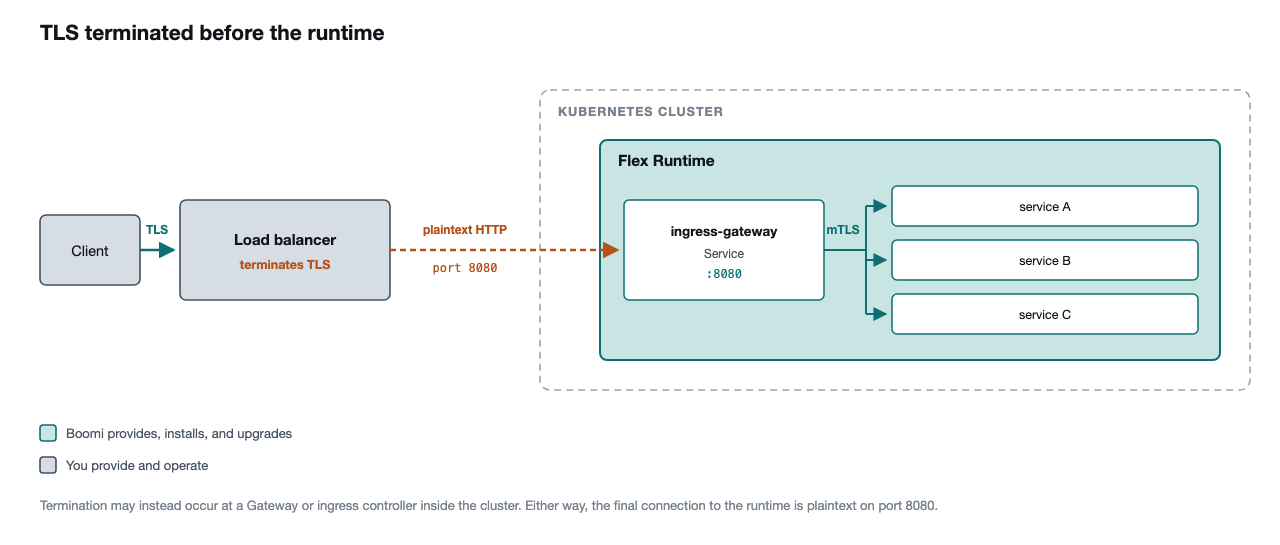
Route to the ingress-gateway Service on port 8080. Nothing further is required.
5c. End to end TLS
In this scenario, traffic remains encrypted the whole way to the runtime. The client's TLS session terminates in your own infrastructure as before, and whichever component makes the final connection to the runtime, whether the load balancer itself or a Gateway or ingress controller within the cluster, opens a new TLS connection to ingress-gateway. Each hop is encrypted under its own certificate, and no private key of yours is ever handed to Boomi. It suits environments where policy requires that traffic is never plaintext on the wire, including inside the cluster.
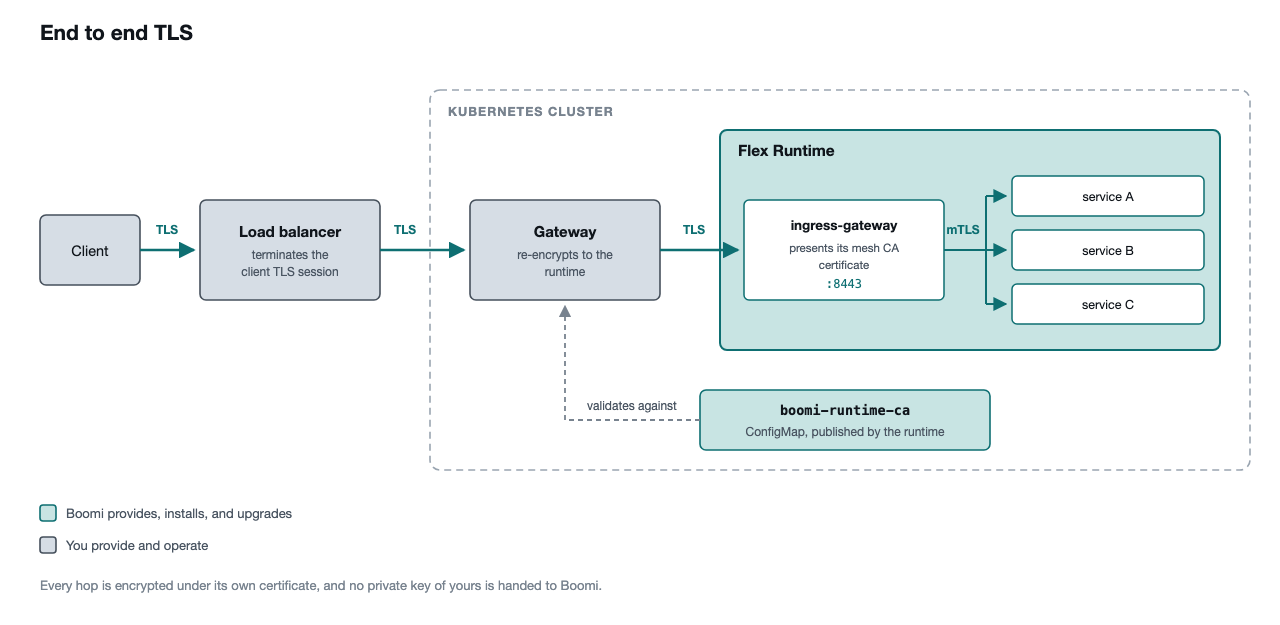
On that final connection, ingress-gateway presents a certificate issued by the runtime's own internal certificate authority. The component connecting to it will not trust that authority by default, and must be given the authority's certificate to validate what it is presented with.
The runtime publishes that certificate into its own namespace as a ConfigMap named boomi-runtime-ca, holding the certificate under the key ca.crt. The runtime creates and maintains it, so it requires no action on your part, and it is the trust bundle your routing layer should be configured against.
Route to the ingress-gateway Service on port 8443 over HTTPS, and validate the certificate it presents against that ConfigMap. If using a Gateway, it is expressed as a BackendTLSPolicy, shown below. Other mechanisms express the same thing in their own terms, so consult your implementation's documentation for how it consumes a backend trust bundle.
apiVersion: gateway.networking.k8s.io/v1
kind: BackendTLSPolicy
metadata:
  name: ingress-gateway
  namespace: <namespace>
spec:
  targetRefs:
    - group: ""
      kind: Service
      name: ingress-gateway
      sectionName: https
  validation:
    caCertificateRefs:
      - group: ""
        kind: ConfigMap
        name: boomi-runtime-ca
    hostname: ingress-gateway.<namespace>.svc.cluster.local
