Granting temporary account access to Boomi support users
You can grant temporary account access to Boomi support users by using Temporary Elevated Access Management in the Boomi Enterprise Platform.
About this task
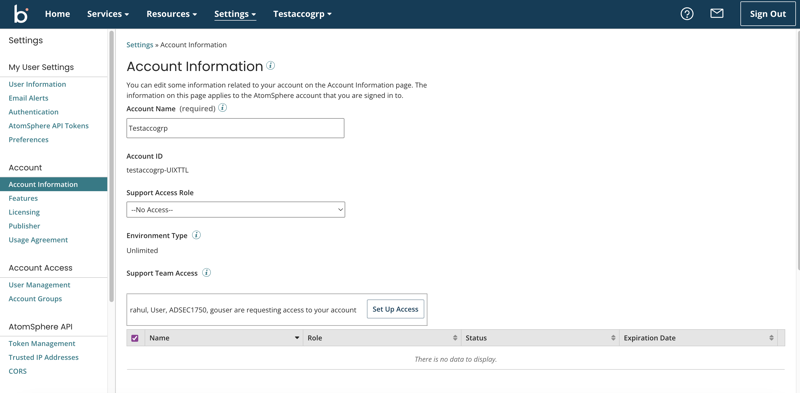
If Support Access Role is set to No access on the Account Information panel to prevent Boomi support users from accessing your account, you can provide temporary credentials to allow limited access for support.
You must be an account administrator to use this feature.
-
When a Boomi support team member requests access to your account, the request displays in the Support Team Access section of the Account Information panel. Click Set Up Access to configure the temporary credentials.
-
Choose the access role that you want to grant the support team member and set an expiration date for the credentials to end.
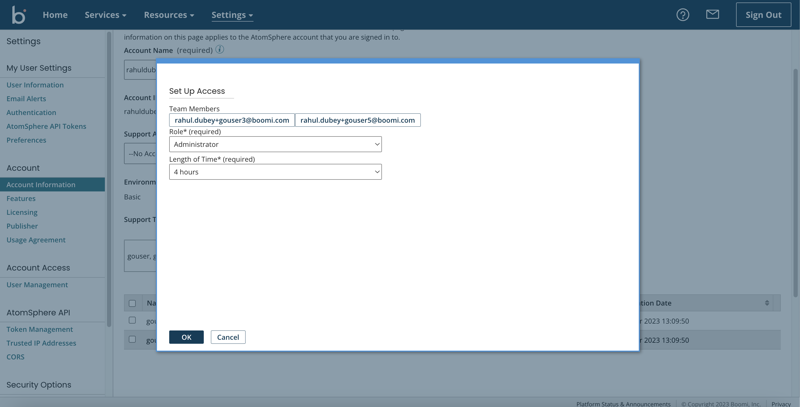
Click OK to save the configuration.
Once you have granted access to a user, you can Extend their credentials or Expire their access early.
