Decision Engine agent design guidance
Decision Engine mode is an Early access feature. Refer to the Early Access disclaimer for details.
This topic covers schema design requirements and best practices for Decision Engine mode agents. For an overview of Decision Engine mode, including benefits, use cases, and how it compares to other agent modes, refer to Using Decision Engine mode. For step-by-step setup instructions, refer to Building an agent in Decision Engine mode.
Important considerations
- You must use Decision Engine mode agents in agentic workflows. Call your agent through the Agent step in Integration. Refer to Agent step overview for tutorials.
- JSON format must be in draft 04 schema. Refer to JSON Schema Draft 4 for more information.
Designing input schemas
Input schemas define the data that the agent receives. Add description fields to explain the business meaning of each property so the model can interpret the data correctly. Descriptions help the model make better decisions but do not change which decision type the engine selects for the output.
If your output schema contains unbounded fields (strings, integers, or numbers without enum values or bounds), supply candidate values in the input. For example, include a candidate_owners array so the engine can select from known names rather than inventing one.
The following example shows an input schema for a support ticket router agent:
JSON input schema example
{
  "$schema": "http://json-schema.org/draft-04/schema#",
  "title": "Support Ticket Router Input",
  "type": "object",
  "additionalProperties": false,
  "properties": {
    "ticketId": {
      "type": "string",
      "description": "Unique identifier for the support ticket"
    },
    "customerMessage": {
      "type": "string",
      "description": "The customer's support message or complaint"
    },
    "customerTier": {
      "type": "string",
      "description": "Customer support tier, such as standard, gold, or enterprise"
    }
  },
  "required": ["ticketId", "customerMessage"]
}
The following example shows an input that matches the schema:
JSON input example
{
  "ticketId": "TKT-40921",
  "customerMessage": "We were overcharged for 3 months straight and we want an immediate refund. This is unacceptable for a paying customer.",
  "customerTier": "gold"
}
Designing output schemas
Because Decision Engine is not an LLM, it cannot generate free-form text. Every output field must map to one of the decision types that Decision Engine supports. The following table shows how JSON Schema field types translate to its decisions.
| Schema type | Decision Engine decision | Behavior |
|---|---|---|
string with enum | Choice | It selects one value from the enum list. |
boolean | Yes/No | It returns true or false. |
integer or number with minimum/maximum | Score (bounded) | It selects a value within the range. The range acts as a decision scale (2 to 10 levels supported). Do not use for arithmetic. |
integer or number with x-rubric | Score (rubric) | It evaluates ordered levels you define in the x-rubric array (up to 10 levels) and returns the corresponding integer. |
string, integer, or number without enum or bounds | Candidate selection | It selects from values found in the input or tool results. It cannot invent new values. If no candidate exists and the field is not required, it is omitted. |
object | Nested object | It evaluates each leaf field individually and assembles the result. Keep nesting shallow (up to three levels). Use additionalProperties: false. |
array with items.enum | Multi-select | Each enum member gets an independent yes/no decision. Selected members are assembled into the output list. |
The following example shows an output schema for a support ticket router agent. This schema demonstrates several field types: a choice (department), bounded scores (priority), a rubric score (frustration_score), booleans (needs_human_review, refund_requested, churn_risk), and confidence metadata (x-decision-meta).
JSON output schema example
{
  "$schema": "http://json-schema.org/draft-04/schema#",
  "title": "Support Ticket Router Output",
  "type": "object",
  "additionalProperties": false,
  "properties": {
    "department": {
      "type": "string",
      "enum": ["billing", "technical", "shipping", "account"],
      "description": "Primary department responsible for handling the customer request."
    },
    "priority": {
      "type": "integer",
      "minimum": 1,
      "maximum": 5,
      "description": "Ticket priority from 1 (routine) to 5 (critical)"
    },
    "needs_human_review": {
      "type": "boolean",
      "description": "Whether the request requires investigation, exception handling, or intervention by a human support agent."
    },
    "frustration_score": {
      "type": "integer",
      "x-rubric": [
        "Calm",
        "Mildly frustrated",
        "Clearly frustrated",
        "Highly frustrated"
      ],
      "description": "Customer frustration level based on tone and language."
    },
    "refund_requested": {
      "type": "boolean",
      "description": "Whether the customer explicitly requests a refund, credit, reimbursement, or money back."
    },
    "churn_risk": {
      "type": "boolean",
      "description": "Whether the customer is likely to cancel or leave based on tone, tenure, and issue severity."
    },
    "x-decision-meta": {
      "type": "object",
    }
  },
  "required": [
    "department",
    "priority",
    "needs_human_review",
    "frustration_score",
    "refund_requested",
    "churn_risk",
    "x-decision-meta"
  ]
}
The following example shows an output that matches the schema:
JSON output example
{
  "department": "billing",
  "priority": 5,
  "needs_human_review": true,
  "frustration_score": 3,
  "refund_requested": true,
  "churn_risk": true,
  "x-decision-meta": {
    "department": { "value": "billing", "confidence": 1 },
    "priority": { "value": 5, "confidence": 0.82 },
    "needs_human_review": { "value": true, "confidence": 0.94 },
    "frustration_score": { "value": 3, "confidence": 0.82 },
    "refund_requested": { "value": true, "confidence": 0.97 },
    "churn_risk": { "value": true, "confidence": 0.92 }
  }
}
Decision Engine validates every field against the schema before it returns the response.
Writing field descriptions
Field descriptions act as short prompts that steer the model. Keep them to one or two sentences that explain the business meaning of the field. For example:
"description": "Overall release risk."(good, concise)"description": "Evaluate the change against all risk factors and return the risk level."(too directive, restates what the schema already controls)
Writing task instructions
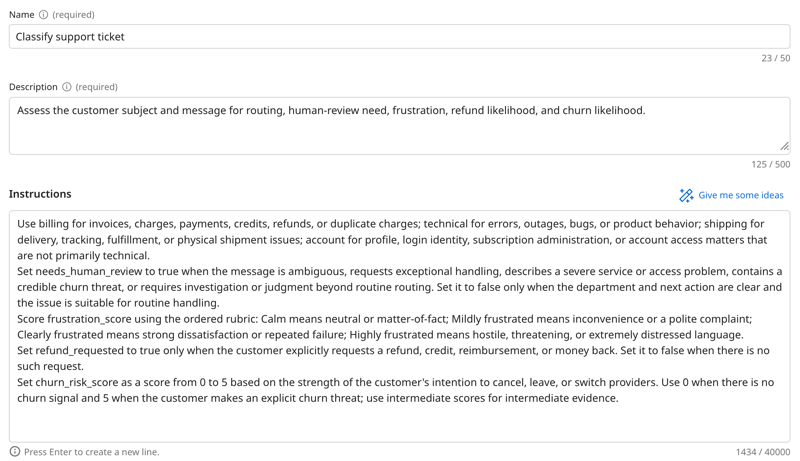
Put detailed business rules and decision rubrics in task instructions, not in field descriptions. Good task instructions define:
- What each choice or score level means in business terms (for example, what qualifies as "high risk" versus "moderate risk")
- Thresholds and conditions for boolean fields (for example, "auto-approve is true only when risk is low and rollback is available")
- How to match candidates to context (for example, "prefer Maya for identity migrations, Priya for security reviews")
- When to omit optional fields (for example, "omit the owner if no candidate matches the change type")
Avoid restating schema mechanics in task instructions, such as "return only JSON," "select exactly one enum value," or "do not add commentary." The decision engine already handles typed output, schema validation, and enum membership.
Adding confidence metadata with x-decision-meta
Add x-decision-meta as an empty object in your output schema to receive per-field confidence scores from the decision engine:
{
  "x-decision-meta": {
    "type": "object"
  }
}
When present, the engine populates it with a confidence score (0 to 1) for each output field. You can use these scores for confidence gating in your integration, for example, routing decisions below a confidence threshold to a human reviewer. Do not add properties to this object or write task instructions to populate it. The engine generates the values automatically.
Adding tools and knowledge
Tools that fetch reference data (policies, profiles, glossaries) work well with Decision Engine mode. This includes API, MCP, DataHub, and Application tools as well as knowledge bases and glossaries. For example, the model can decide on the urgency of a support ticket by fetching a customer profile in a CRM that includes information about their support tier and VIP status.
Tool output must be in JSON format for values to be injected into the agent output. The model can use free-form text from tools as context for its decisions, but JSON is required for direct value insertion into output fields.
Prompt tools are not recommended with Decision Engine mode. Prompt tools rely on LLM calls to apply few-shot learning, which adds latency and negates the speed advantage of Decision Engine mode.
