Using your own models with agents
Bring Your Own Model and Deploy Agents Anywhere features in Boomi Agentstudio are part of Boomi's Early Access program, which offers beta versions of Boomi innovations on an "as is" basis, with no warranties. These features are not final production releases, are unsupported under Boomi's service agreements and support services, and are not intended for production use. While Boomi will work to address issues encountered during the preview and welcomes participant feedback, any feedback provided, whether ideas, suggestions, code, or recommendations, oral or written, is irrevocably assigned to Boomi, LP. By participating, you confirm you have the authority to provide that feedback, will not assert any intellectual property claims against Boomi, and that Boomi may freely implement it without violating any party's rights. If a beta feature doesn't meet Boomi's standards or raises significant concerns, it may never reach general availability, and Boomi cannot guarantee any particular innovation will be released in a supported form. Note that some innovations may only be available as open source or for specific runtime configurations. Documentation may be provided as PDFs, online, or on Community forums.
Refer to the Early Access page to view current programs and request Early Access for a specific feature.
You can connect large language models (LLM) from your own Anthropic, OpenAI, or Google account to agents you build in Agent Designer using an API key. Agents using your own LLM execute in your self-hosted, managed Flex runtime environment in the Boomi Platform. Running self-hosted agents that use your own LLM account allows your organization to:
- Run agent execution and orchestration in infrastructure you control, supporting your organization's compliance requirements
- Leverage your existing LLM provider's usage and cost agreements
- Send model prompts directly to your own LLM account rather than through Boomi-managed model infrastructure
Before you can deploy and run an agent using your LLM account, you must set up a Flex runtime in the Boomi Platform. To set up your Flex runtime account for agents, you'll complete some setup steps, including creating a Kubernetes cluster. For more information on how to set up your runtime environment, refer to Flex Runtime.
Prerequisites
To run agents you build in Agent Designer with your own LLM account, you must:
- Sign up for the Bring Your Own Model early access feature to enable the Model connection screen in Agentstudio on your account. Signing up also enables the Deploy Agents Anywhere feature and the Flex Runtime feature in your account.
- Set up a Flex runtime environment in the Boomi Platform where your agent will execute. This is a self-hosted runtime that requires some preliminary setup, including setting up a Kubernetes cluster and installing a Runtime CLI.
- Have Agent Garden Administrator or Developer privileges.
- Have your LLM account's (Anthropic, OpenAI, or Google) API key.
Important considerations
Review these important points before you get started.
- You can run your agents with Anthropic, Google Gemini, and OpenAI models for agentic workflows. This means you can use them in Agent step for processes in Integration. Interacting with agents conversationally through Agent Garden or in your own applications with Embed Kit are not supported at this time. Refer to Agent step overview for guidance on setting up your agentic workflow in Integration.
- Before deploying your agent in a self-hosted runtime, you must set up a Flex runtime production environment. The Bring Your Own Model feature currently supports production environments only.
- Test your agent with the Test mode option in Integration that allows you to test a process using Agent step. Testing agents through the Agent Designer test panel is not supported with the Flex runtime.
- The Bring Your Own Model feature currently supports the following:
- Authentication: Basic Auth, Token Auth
- Tools: MCP, Prompt, and API tools
- The Bring Your Own Model feature does not currently support:
- Agentstudio APIs: The Agent Garden REST APIs do not expose model connections in this release. BYOM is configured through the user interface only.
- File uploads: File upload cannot be enabled on an agent that uses a self-managed model. Refer to Enabling file uploads for more information.
- Deployment to Boomi-managed runtime clouds.
- Knowledge Bases and Business Glossaries.
- Model selection is not retained when exporting and importing agents. After importing, reselect the model you want to use.
Supported LLM providers
The Bring Your Own Model feature in the Model connection screen currently supports three LLM providers:
- Anthropic
- OpenAI
What data can Boomi access?
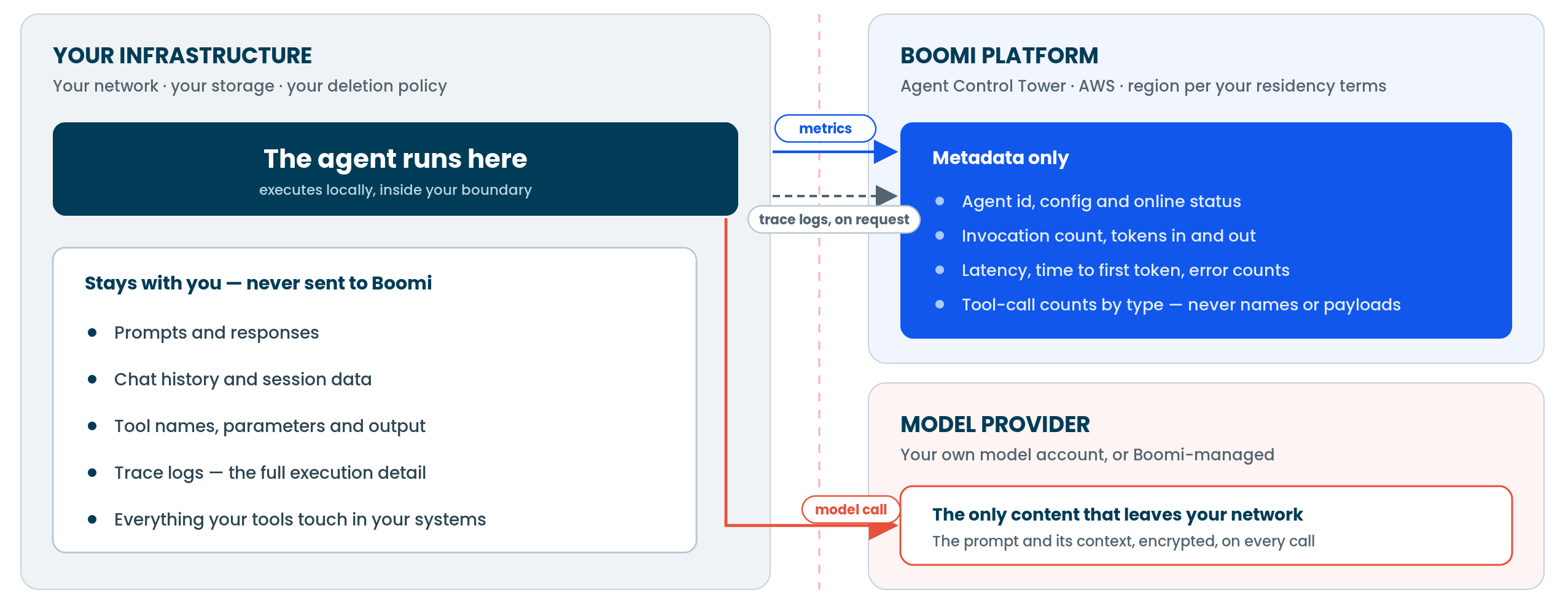
For agents deployed to self-hosted runtimes, data exists in three locations:
- Your infrastructure: You own and retain everything the agent touches during execution. This includes prompts and responses, chat history and session data, tool names, parameters and output, and full trace logs. None of this is sent to Boomi. The Boomi Platform retrieves trace logs on demand by calling your runtime, similar to how integration runtimes work today. The source of record stays with you.
- Boomi Platform: Boomi retains only non-confidential metadata about your agent, such as the agent ID, configuration, and basic operational metrics (for example, invocation count, token input/output, latency, and tool-call counts by type). Boomi never receives the tool names or payloads behind those counts.
- Model provider: The only content that leaves your network is the prompt and its context, sent encrypted on every model call to your connected model provider (your own account, or Boomi-managed).
Next steps
Attach a model to your agent. Refer to Connecting models to Agentstudio.
