MCP (Model Context Protocol) Support on the Boomi Platform
The Boomi Enterprise Platform supports the Model Context Protocol (MCP), a standardized interface that allows large language models (LLMs) and AI agents to securely connect with external resources such as files, databases, tools, prompts, and APIs. This enables reliable agent-to-tool communication, ensuring integrations stay future-proof as the AI ecosystem evolves. It simplifies integration and API management, enables smarter automation, and delivers extensibility and cost efficiency.
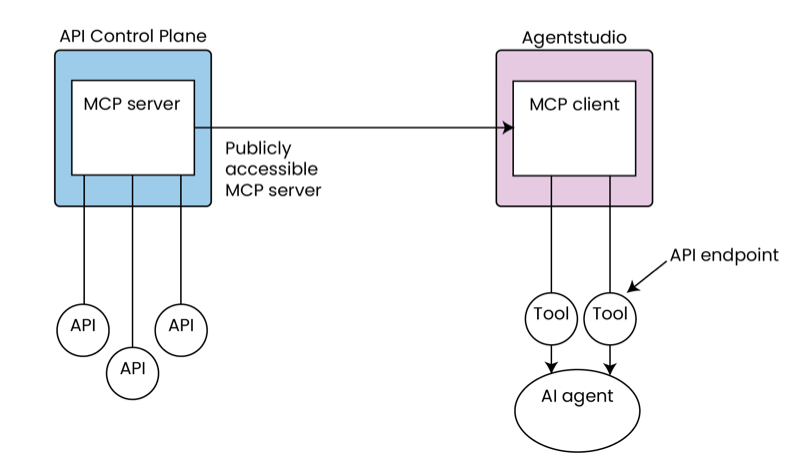
MCP support on the Boomi Platform is delivered through API Control Plane, the Agent Designer, and the MCP Server (Tech Preview). In API Control Plane, APIs are exposed through hosted MCP servers, while the Agent Designer allows AI agents to discover, import, and manage those resources. Together, they provide a complete path for connecting APIs with AI agents. The MCP Server (Tech Preview) enables you to integrate MCP servers directly within your Boomi runtime environment.
What is MCP?
MCP acts as a universal language or interface that AI agents and LLMs can use to connect to enterprise tools. Instead of building a unique, manual integration for every possible pair of agent and tool, MCP provides a common way for any agent to connect to any tool, making integration much simpler and more consistent.
At its core, MCP is designed to act as a broker between agents and capabilities. Capabilities can include APIs, file systems, prompts, or databases. These are exposed to agents via MCP servers, which register the available tools and define their input/output schemas and invocation mechanics. Agents connect to one or more MCP servers through MCP clients embedded in host applications (such as Claude Desktop, Replit).
Traditionally, if you have five agents and 10 tools, you would need to build 50 separate integrations for each agent-tool pair. MCP eliminates this complexity by acting as a central hub where agents and tools only need to integrate with MCP, not with each other directly, drastically reducing integration effort, especially as your organization scales up the number of agents or tools it uses.
Benefits
-
Facilitates seamless data integration within your enterprise systems through the flexibility of the Boomi Platform. You can effortlessly connect data sources to AI agents in the Agent Designer.
-
Expose APIs through hosted MCP servers in API Control Plane.
-
Streamlines the maintenance of AI agents and their tools by automatically retrieving the latest updates. This automation configures and updates tools with minimal manual intervention and ensures seamless synchronization with source systems, simplifying the update process when changes occur.
-
Provides a consistent method for connecting AI agents to any endpoint. It reduces the maintenance and overhead of managing disparate APIs and scales more easily.
MCP use case
Discover how MCP support can accelerate intelligent automation and drive business outcomes. Refer to the use case on improving field service efficiency to learn more.
MCP in API Control Plane
Through the API Control Plane, Boomi makes it simple to expose API endpoints from managed API Products as MCP tools. This transforms your APIs into ready-to-use AI Agent tools without the overhead of custom development.
Automatically generate MCP resource and tool definitions from existing API definitions in API Control Plane. Once enabled, requests flow seamlessly, allowing AI Agents to consume and act on enterprise APIs with governance, discoverability, and security in place.
In API Control Plane, you can expose APIs through hosted MCP servers. The MCP server provides a non-empty list of Tools. Each Tool is an endpoint in an API that is registered in API Control Plane.
To get started with the MCP in API Control Plane, refer to MCP in API Control Plane.
Using MCP in Agent Designer
The Agent Designer extends MCP support even further, enabling AI Agents to discover and invoke tools from MCP-compliant servers. This plug-and-play connectivity allows custom AI Agents to connect seamlessly to enterprise data sources and tools, making it easy to scale automation initiatives.
Within Agent Designer, you can add an MCP source, provide the MCP server URL and credentials, import and manage tools, and attach MCP tools to agents just like any other tool. The MCP client-server connection automatically updates when schemas change. This feature enables Agent Designer to flag tools as stale when updates are required, ensuring that agents remain reliable and up-to-date.
MCP tools currently support Basic, Token, and JWT authentication. OAuth support will be available in an upcoming release.
To get started with using MCP in Agent Designer, refer to Connecting to an MCP Server.
MCP Server (Tech Preview)
The new MCP Server (Tech Preview) enables you to integrate Model Context Protocol (MCP) servers directly within your Boomi runtime environment. This connector transforms your deployed Boomi processes into discoverable, callable tools that any MCP-compatible client can access and execute.
Key capabilities
-
Native MCP Integration: Expose Boomi processes as standard MCP tools, making them accessible to AI agents and applications.
-
Conversational Interface: Create secure, scalable endpoints that AI-driven applications can interact with naturally, from help desk assistants to complex operational agents.
-
Leverage Existing Integrations: For organizations with established Boomi integrations, this connector enables deterministic, agent-driven workflows that can access legacy applications and internal systems through your existing integration logic.
To get started with using the MCP Server (Tech Preview), refer to MCP Server (Tech Preview).
