Getting started with Orchestrate
Boomi Orchestrate is an orchestration layer and AI-driven solution design experience that helps you turn a business problem into a cross-product solution. It facilitates development transparency, collaboration, and visibility across enterprise teams while being accessible to team members with minimal Boomi expertise.
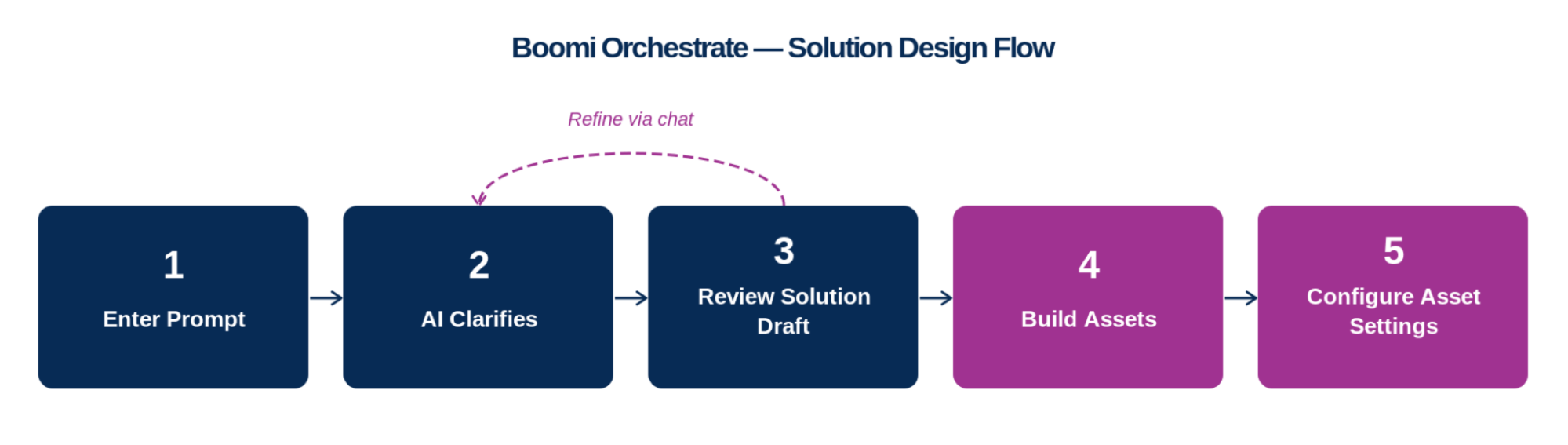
Using natural language, you describe what you want to build, and Boomi Orchestrate generates a solution draft that maps the Boomi products and assets needed to achieve your goal. After you approve the draft, Boomi Orchestrate builds your solution assets. It then configures and fine-tunes them, and deploys your assets to production in Boomi services.
Orchestrate uses your de-identified account metadata, Meta Hub business glossaries, and your conversational prompts to craft an end-to-end Boomi solution blueprint. You can ask questions, discuss, and refine your solution with Orchestrate to deliver a fully custom Boomi Platform solution.
Availability
Orchestrate is generally available in the North America Boomi Platform. Account administrators enable Orchestrate from Settings > Features. Refer to Access and permissions for details.
Key benefits
Orchestrate helps your business:
- Design cross-product solutions grounded in your business context and built on Boomi best practices.
- Turn a business problem into a unified solution in the Boomi Platform with minimal Boomi service expertise.
- Manage Boomi Platform assets (integration components, data models, APIs, AI agents) in a unified, visible space for improved governance and collaboration.
What Boomi Orchestrate does
Boomi Orchestrate helps you design solutions at the platform level across Integration, Data Hub, API Management, Event Streams, and Agentstudio. It:
- Generates a solution draft based on Boomi best practices, your de-identified account metadata, your Meta Hub business glossaries, and your conversational prompts.
- Asks clarifying questions to refine the solution before creating any assets.
- Organizes the solution into Solution View, a layer-based map of the solution's business capabilities, as the default view after generation.
- Displays each asset as a node in Asset View, with lines connecting assets.
- Lets you build individual assets directly from Asset View once you confirm the design.
- Provides Business View, a read-only, plain-language PDF export of the solution's business capabilities and goals.
Boomi Orchestrate is a solution building tool. In the current release, it does not test, deploy, or operate solutions.
Solution design flow
The following diagram displays the solution building process. Refer to Designing solutions with AI for more details and step-by-step guidance.
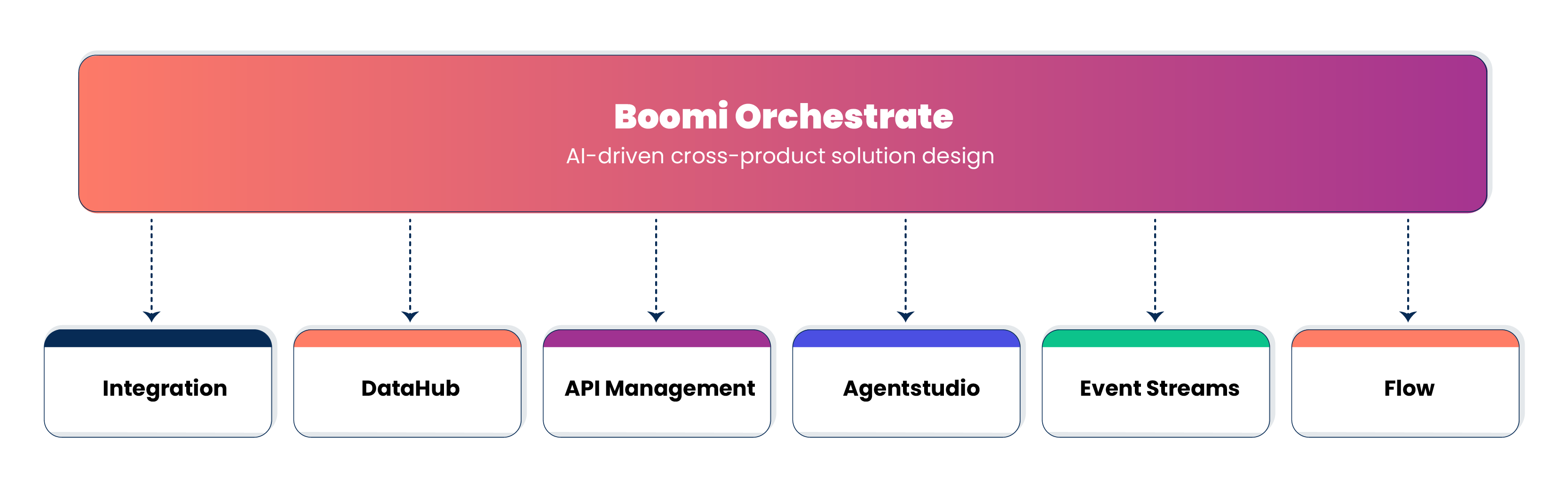
How Orchestrate connects to Boomi Platform services
Orchestrate's solution design layer sits above core Boomi services (Integration, Data Hub, Agentstudio, APIM, Event Streams, and others). When you describe a business goal in plain language, Orchestrate generates a solution as a visual canvas, where each node represents a real asset that Orchestrate created in its respective service — for example, an Integration process, Data Hub model, API, or agent. A single solution can span multiple services, with connections between nodes showing how the components work together to achieve the outcome.
Orchestrate assigns each generated asset an ID and links it directly to its home service. From the canvas, you can navigate from the asset (Actions > View Details > Manage) and configure it from within the linked platform service. Orchestrate handles initial design and asset management, while the underlying services manage the execution.
Supported services
Orchestrate builds solutions that may involve the following Boomi Platform services:
- Integration
- Data Hub
- APIM
- Agentstudio
- Event Streams
- Flow
Orchestrate key concepts
Node
A node is the visual representation of an asset in a solution draft. Each node shows the asset type, its name, and its current build state. Orchestrate connects nodes with lines that show their relationships in the solution.
Asset
An asset is an individual component in a solution that corresponds to a Boomi product or capability. Each asset node in Asset View represents one of the following:
- Integration process
- Data Hub model
- API Management API
- Agentstudio agent
- Event Streams topic (availability varies by account)
Assets are not immediately configured or deployed when Orchestrate generates a solution. Each asset contains a deep link to its corresponding product for configuration after you save and build the solution.
Solution
A solution is a cross-product, design-time architecture that represents how multiple Boomi assets work together to achieve a business goal. A solution must contain more than one asset to be counted as a valid solution.
Each solution has a unique ID and Orchestrate assigns it a version number automatically, as you save changes.
Solution design phase
At the current release, Boomi Orchestrate focuses on the design phase only. It helps you generate and refine a solution draft, a structured proposal of Boomi Platform assets and their relationships. Orchestrate does not yet test, deploy, or operate live solutions.
Conversational panel
The AI chat interface within Orchestrate is where you enter prompts, select business glossaries, answer clarifying questions, and refine your solution. The panel guides you through intent refinement before generating the solution draft.
Asset View
Asset View is the canvas where you see your solution displayed as a visual architecture map for implementation. Each node represents an asset, and lines between nodes indicate a connection between assets. Asset View is where you confirm, edit, and build the assets in your solution.
Solution View
Solution View is a layer-based visualization of your solution's business capabilities. It displays as the default view when Orchestrate generates a solution, organizing the solution into seven predefined layers on a canvas and showing you how data flows through the solution. Solution View is read-only and updates automatically when you save changes in Asset View.
Business View
Business View is a read-only, plain-language PDF export of your solution's business capabilities and goals. Generate it by selecting the AI-generated solution summary option when you export a solution to PDF.
Important considerations
- Orchestrate does not introspect or reuse your existing assets when generating a solution. All proposed assets in a solution draft are new and unused.
- Orchestrate does not test, deploy, or operate solutions. After building assets, you configure and deploy them within their respective product service areas (for example, Integration Canvas or Agentstudio).
- Orchestrate does not support version history and rollback to previous solution versions.
- Orchestrate does not support saving blank canvases as new solutions. Every session starts with a prompt or a prompt example.
