Deleting a solution
You can remove a solution from your workspace when you no longer need it. Deleting a solution removes it from the Workspaces > Solutions view, but does not delete the assets that Orchestrate built as part of that solution.
Before you begin
Understand the following before deleting a solution:
- Deleting a solution from the workspace permanently removes the solution entity, including its canvas and conversational history.
- Any assets that Orchestrate built as part of the solution such as Integration processes, API Management APIs, or Agentstudio agents are not deleted. They continue to exist in their respective Boomi products.
- You cannot undo this action.
Once you delete a solution:
- The solution no longer appears in Workspaces > Solutions.
- Built assets remain in their home products and remain unaffected.
- If you want to remove a successfully built asset, navigate to the corresponding product (for example, Boomi Integration) and delete it from there.
Deleting a solution from the Workspaces view
-
Select the Boomi logo dropdown in the upper-left corner of the navigation bar to open the Orchestrate menu.
-
Select Workspaces. The main workspace opens.
-
Locate the solution from the left navigation that you want to delete.
-
Select More Options next to the solution name or next to View Details on the main workspace.
-
Select Delete. Confirm the deletion when the system prompts you.
Deleting a solution from the canvas
You can also delete a solution while working on the canvas:
-
Open the solution canvas.
-
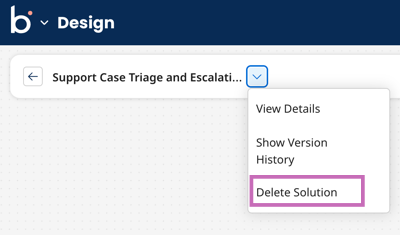
Select the Actions drop-down in the canvas toolbar.
-
Select Delete solution. Confirm the deletion when the system prompts you.
Deleting a linked asset from Workspaces
You can also delete an individual linked asset directly from the Workspaces asset list, separate from deleting the entire solution. Doing so does not delete the asset in its home product, the asset continues to exist there and can still be managed directly in that product (for example, Boomi Integration).
