Defining the golden record title format for a model
Define the golden record title format for a model in the Record Title Format tab in the model page.
About this task
Golden record titles appear in the golden record data grid, quarantine entry lists, and staged entity lists, which you can access through the Stewardship menu. You will also see them as headings in the detailed views of golden records, quarantine entities, and staged entities. Additionally, the title format field values from referenced golden records appear as reference field values on the Golden Records and Quarantine pages for resolved references. A title format definition consists of selected fields and, optionally, static text strings, including spaces. You cannot add masked fields to the record title format.
Procedure
-
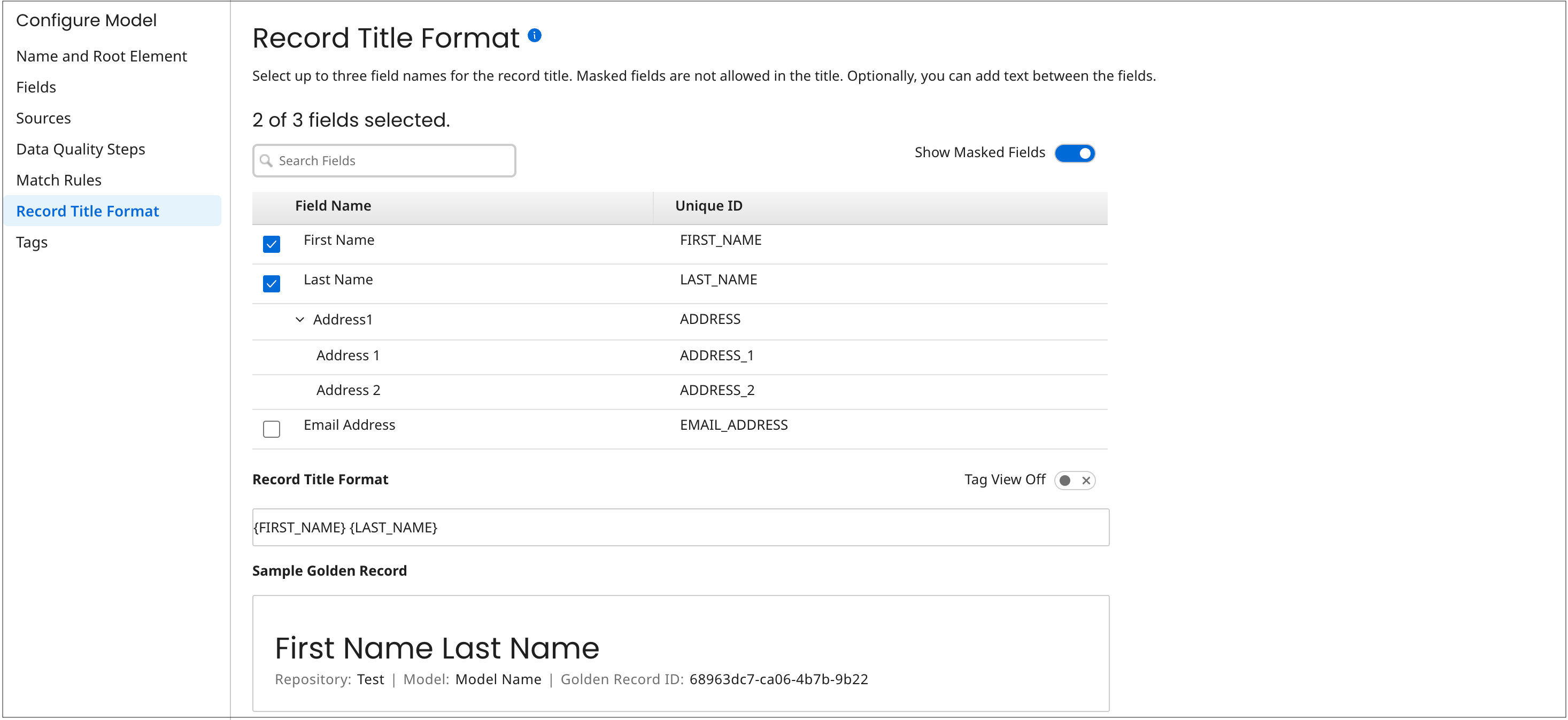
In the model page’s Record Title Format tab, you can select up to three fields to be included in the golden record title format by turning on their check boxes. You cannot select the reference fields and collection fields.
The unique ID of each selected field appears in brackets below in the Record Title Format field. The Sample Golden Record box shows an example of the format in the context of a golden record detail view heading.
-
Optional: To filter the list, type a character in the search field to display only the fields and field groups that match the entered characters.
-
Optional: To hide masked fields from the list, you can turn off the Show Masked Fields setting, which is turned on by default. You cannot select masked fields.
-
Optional: To reorder the fields in the format, switch the Record Title Format field to Tag View On, and then you can drag and drop the field tags as desired.
-
Optional: To insert static text strings before, between, or after the fields in the format, switch the Record Title Format field to Tag View Off and type the strings.
