Assigning entitlements to a custom role
An entitlement is a Boomi Data Hub-specific right reserved to a role. In order to be assigned entitlements, a user must first be assigned a role with the MDM - Stewardship privilege.
Procedure
-
From the Settings page, select User Management tab.
-
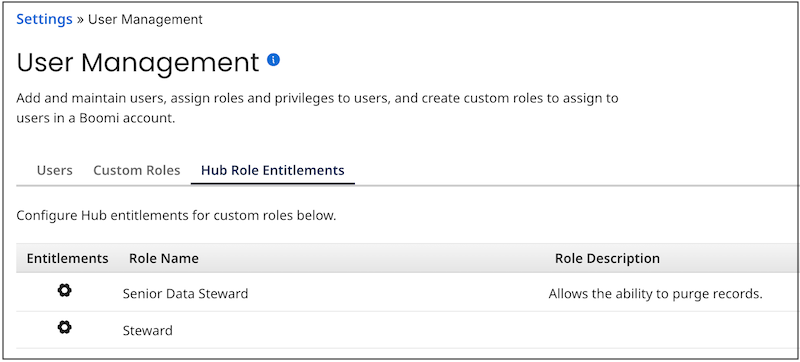
Select the Hub Role Entitlements sub-tab.
-
In the Entitlements column for the custom role to which you want to assign entitlements, click the gear icon
 .
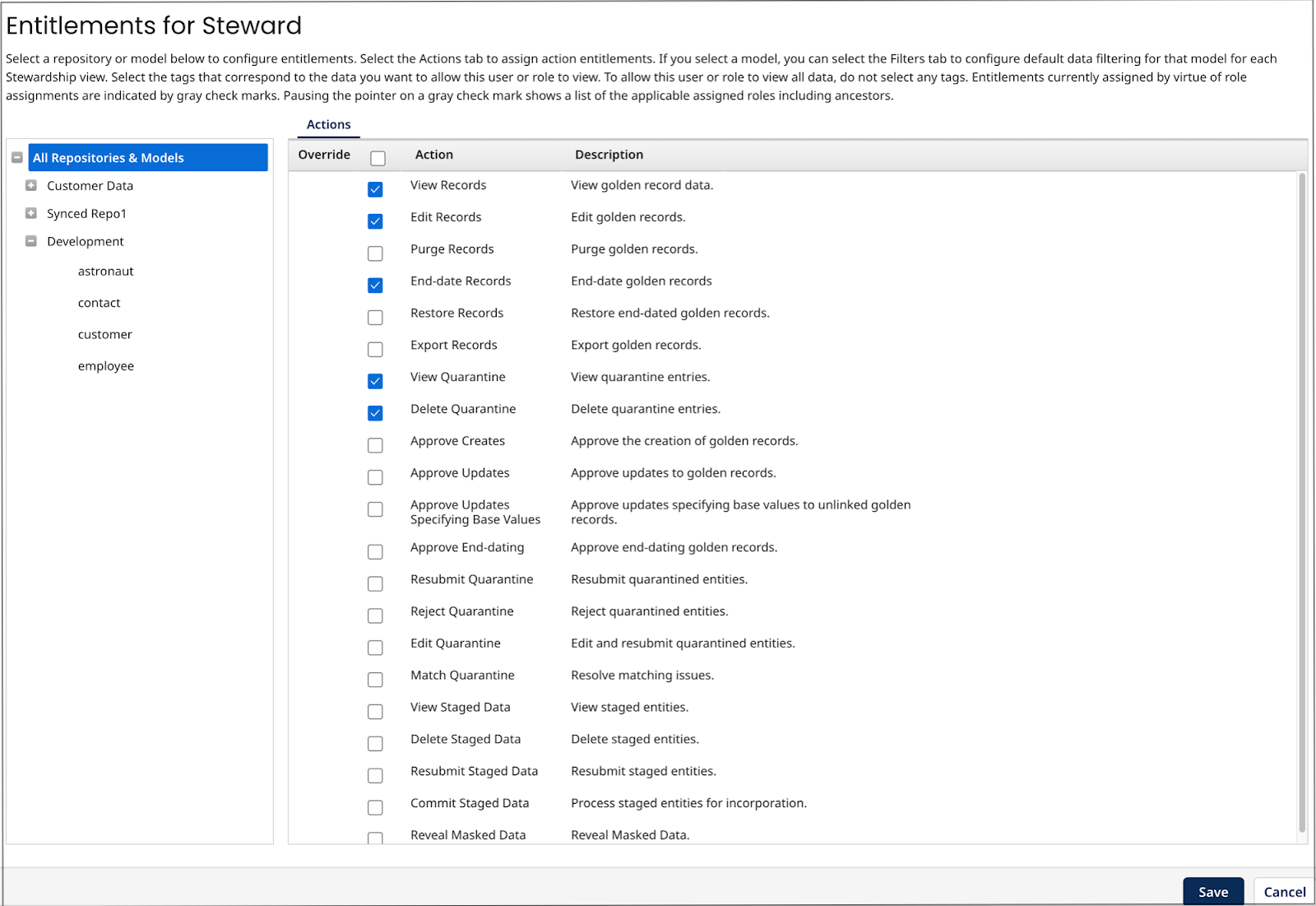
.The role Entitlements dialog appears.
-
Select action entitlements for users with this role:
Entitlements assigned to a parent or ancestor role are indicated by a gray check mark in the Override column.
Action entitlements cascade downward: Entitlement assignments made at the top level, All Repositories & Models, are applicable to all repositories and domains, and these assignments cascade down to both the repository and domain levels. Entitlement assignments made at the repository level cascade down to the domain level. You should therefore first evaluate the need for entitlement assignments at the top level.
-
Optional: To select entitlements applicable to all repositories and their hosted domains, select All Repositories & Models in the left-hand list, and in the right-hand list, select the check boxes for the desired entitlements.
-
Selecting Edit Records, Purge Records, End-date Records, Restore Records, or Export Records also selects View Records.
-
Selecting Delete Quarantine, Approve Creates, Approve Updates, Approve End-dating, Reject Quarantine, Resubmit Quarantine, Edit Quarantine, or Match Quarantine also selects View Quarantine.
-
Selecting Delete Staged Data, Resubmit Staged Data, or Commit Staged Data also selects View Staged Data.
-
-
Optional: To select entitlements applicable to all domains hosted in a particular repository, select the repository in the left-hand list, and in the right-hand list, select the check boxes for the desired entitlements.
-
Optional: Repeat step b for each additional repository for which you want to select repository-wide entitlements.
-
Optional: To select entitlements applicable to a particular domain, select the domain in the left-hand list under the hosting repository, and in the right-hand list, select the check boxes for the desired entitlements.
-
Optional: Repeat step d for each additional domain for which you want to select domain-specific entitlements.
noteTo assign tag-based entitlements for viewing a domain’s golden records (step 7), you must first assign the View Records action entitlement for that domain, its hosting repository or all repositories. Similarly, to assign tag-based entitlements for viewing a domain’s quarantine entries (step 8), you must first assign the View Quarantine action entitlement for that domain, its hosting repository or all repositories.
-
-
Optional: Select domain-specific tag-based entitlements for users with this role for viewing golden records:
-
In the left-hand list, select a domain for which you want to assign entitlements.
-
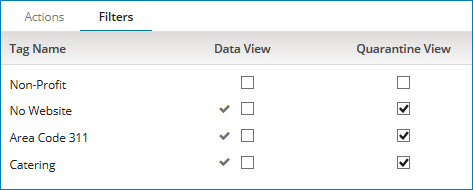
Select the Filters tab.
Entitlements assigned to a parent or ancestor role are indicated by a gray check mark adjacent to the entitlement’s check box.
-
Select the Data View check boxes for the tags by which the data grid in the Golden Records page (Stewardship > Golden Records) is to be filtered by default.
-
Optional: Repeat steps a–c for each additional domain for which you want to assign tag-based entitlements for viewing golden records.
noteDomain-specific tag-based entitlements specify “allow-listed” tags. To prevent default filtering of golden records by tag for a domain, do not select Data View check boxes for that domain.
-
-
Optional: Select domain-specific tag-based entitlements users with this role for viewing quarantine entries:
-
In the left-hand list, select a domain for which you want to assign entitlements.
-
Select the Filters tab.
Entitlements assigned to a parent or ancestor role are indicated by a gray check mark adjacent to the entitlement’s check box.
-
Select the Quarantine View check boxes for the tags by which the quarantine entries list in the Quarantine page (Stewardship > Quarantine) is to be filtered by default.
-
Optional: Repeat steps a–c for each additional domain for which you want to assign tag-based entitlements for viewing quarantine entries.
noteDomain-specific tag-based entitlements specify “allow-listed” tags. To prevent default filtering of quarantine entries by tag for a domain, do not select Quarantine View check boxes for that domain.
-
-
Click Save.
-
To switch back to the Boomi Data Hub service, select Data Hub using the Services icon.
