Defining object definitions for a process
Add or edit object definitions in the Extensions dialog.
Procedure
-
Open the process and click the Extensions link above the process canvas.
The Extensions dialog opens.
-
Select the Object Definitions tab.
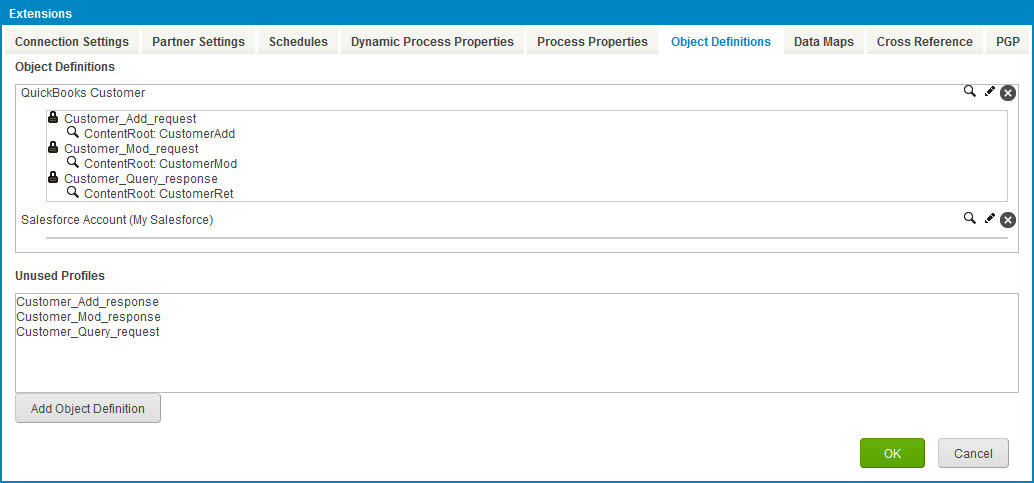
-
Click Add Object Definition.
The User Defined Object Definition dialog opens.
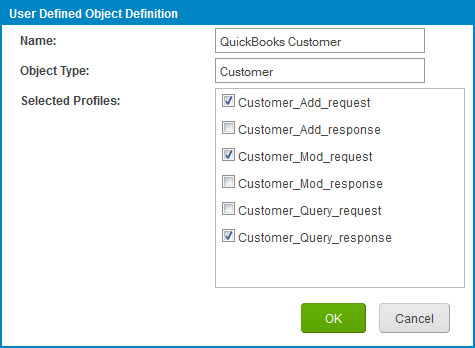
-
In the Name field, type the object definition name.
-
In the Object Type field, type the object type.
-
In the Selected Profiles list, select the check box adjacent to each profile component to include in the object definition.
-
Click OK.
The User Defined Object Definition dialog closes and focus returns to the Object Definitions tab.
-
For each XML profile component in the object definition, set the Content Root:
- Click
 Choose Content Root for Profile.
A dialog opens.
-
Click the name of the element to set as the Content Root.
-
Click OK.
The dialog closes, and focus returns to the Object Definitions tab.
If you do not manually set a Content Root, the root element is used.
- Click
-
For each profile component in the object definition, lock fields to prevent them from being customized:
- Click
 Choose Locked Fields for Profile.
The Locked Fields dialog opens.
-
For each field you want to lock, select the check box adjacent to the element name.
-
When you are done locking fields, click OK.
The Locked Fields dialog closes, and focus returns to the Object Definitions tab.
- Click
-
Set aliases:
- Click Edit Aliases.
The Aliases dialog opens.
-
For each alias you want to set, select the check box adjacent to the element name, and in the adjacent field that appears, type the alias.
-
When you are done setting aliases, click OK.
The Aliases dialog closes, and focus returns to the Object Definitions tab.
- Click
-
Repeat steps 3–10 for each additional object definition you want to define.
-
When you are finished defining object definitions, click OK.
-
Click Save.
After defining object definitions, you need to define data map extensions. See the topic To Define Data Map Extensions for a Process linked below.
