MFT Ops IP Allowlist
The MFT Ops IP Allowlist page allows you to manage an IP allowlist for dedicated environments on AWS.
You must have the MFT Ops - IP Allowlist permission to view and make changes to IP Allowlist settings.
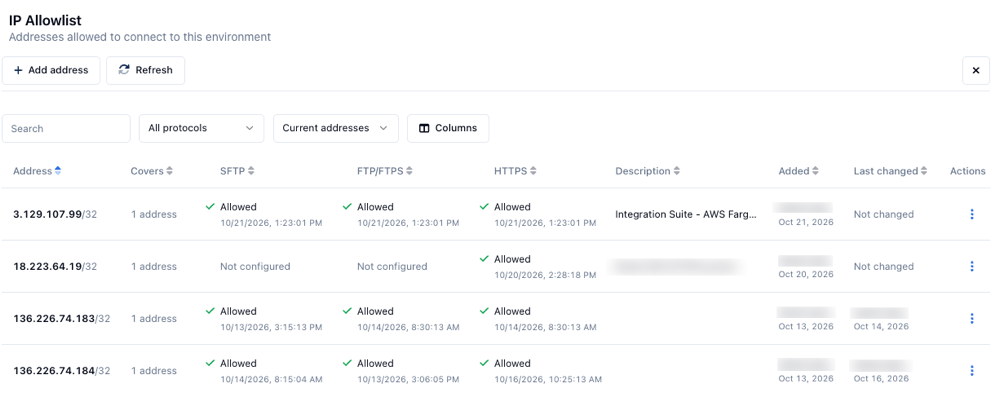
You can use the Search bar to search for a specific IP address, and filter by protocol and whether the IP address is currently allowed or removed. Change which columns show in the table by clicking Columns and checking or unchecking the columns you want to view.
Click Refresh to refresh the page.
To edit the settings for an IP address, click the Actions menu and select Edit. To delete an IP address from the allowlist, click the Actions menu and select Delete.
Adding an IP address to the allowlist
-
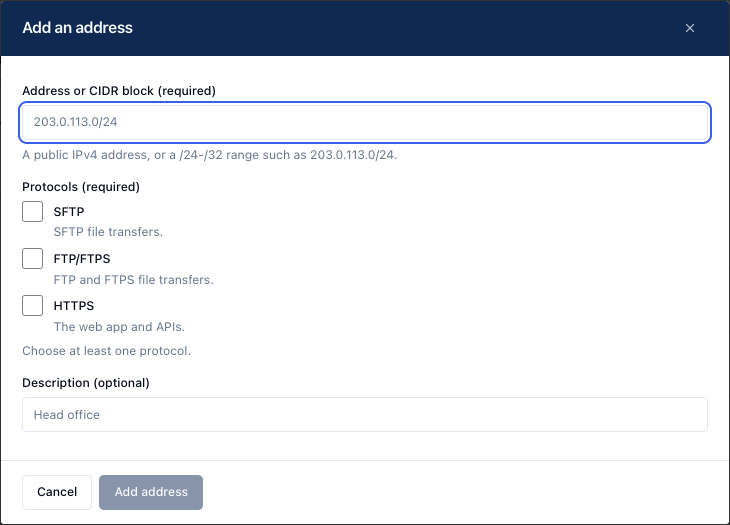
Click Add address. The Add an address dialog displays.
-
(Required) In the Address or CIDR block field, enter a public IPv4 address or a /24 - /32 range, such as
203.0.11.0/24. -
(Required) Select the protocols that you want to include in the allowlist for this IP address:
- SFTP
- FTP/FTPS
- HTTPS
You must select at least one protocol.
-
(Optional) Enter a description in the Description field.
-
Click Add address.
