MFT Runtime
MFT Runtime is a runtime environment that enables MFT Cloud to effectively coordinate the runtime's actions, granting direct access to local folders and directory structures within a local area network through the creation of a File Share endpoint or to any other external endpoint type.
External endpoints now have the option to be served by MFT Runtime in addition to MFT Cloud. When a flow endpoint is served by MFT Runtime, external file repository connections and file transfers are executed by the runtime instead of the cloud. This ensures that files never reside in MFT Cloud, meeting security, compliance, and performance requirements for specific use cases.
If using Node Direct, ensure that external servers permit connections from the IP addresses where MFT Runtime is deployed.
Following installation onto a local device, the runtime is subsequently set up to establish communication with a specific instance of MFT.
Utilizing HTTPS with token-based authentication, the MFT Runtime establishes a connection to MFT Cloud. It's important to note that the connection is unidirectional, originating from the MFT Runtime and reaching out to the cloud. Consequently, no inbound ports need to be opened within a corporate firewall when the runtime is deployed within an internal network environment.
Furthermore, the runtime enables seamless cross-folder delivery and facilitates local device exports. The management and configuration of this feature are carried out in MFT's Flow Studio and the Organization Endpoint within the cloud.
The runtime retrieves Orchestration and Configurations through outbound polling over an HTTPS connection on port 443.
Understanding runtime concurrency
The latest release of the MFT Runtime includes significant improvements to how it handles concurrent operations, providing enhanced performance and greater control over your data transfers.
MFT Runtimes now consistently enforce the concurrency settings configured in the Flow Endpoint settings for individual endpoint transfers, providing more precise control at the endpoint level while separate, higher-capacity limits are being introduced for runtime-wide operations, such as cloud uploads and downloads. This approach allows you to manage endpoint-specific behavior while benefiting from increased overall throughput for the entire runtime.
The following diagram illustrates how the runtime handles concurrency. File endpoints pull files from various sources, processes them in a temporary storage repository, and then sends them to their targets or the MFT cloud, all while reporting the status of each transfer stage back to the cloud.
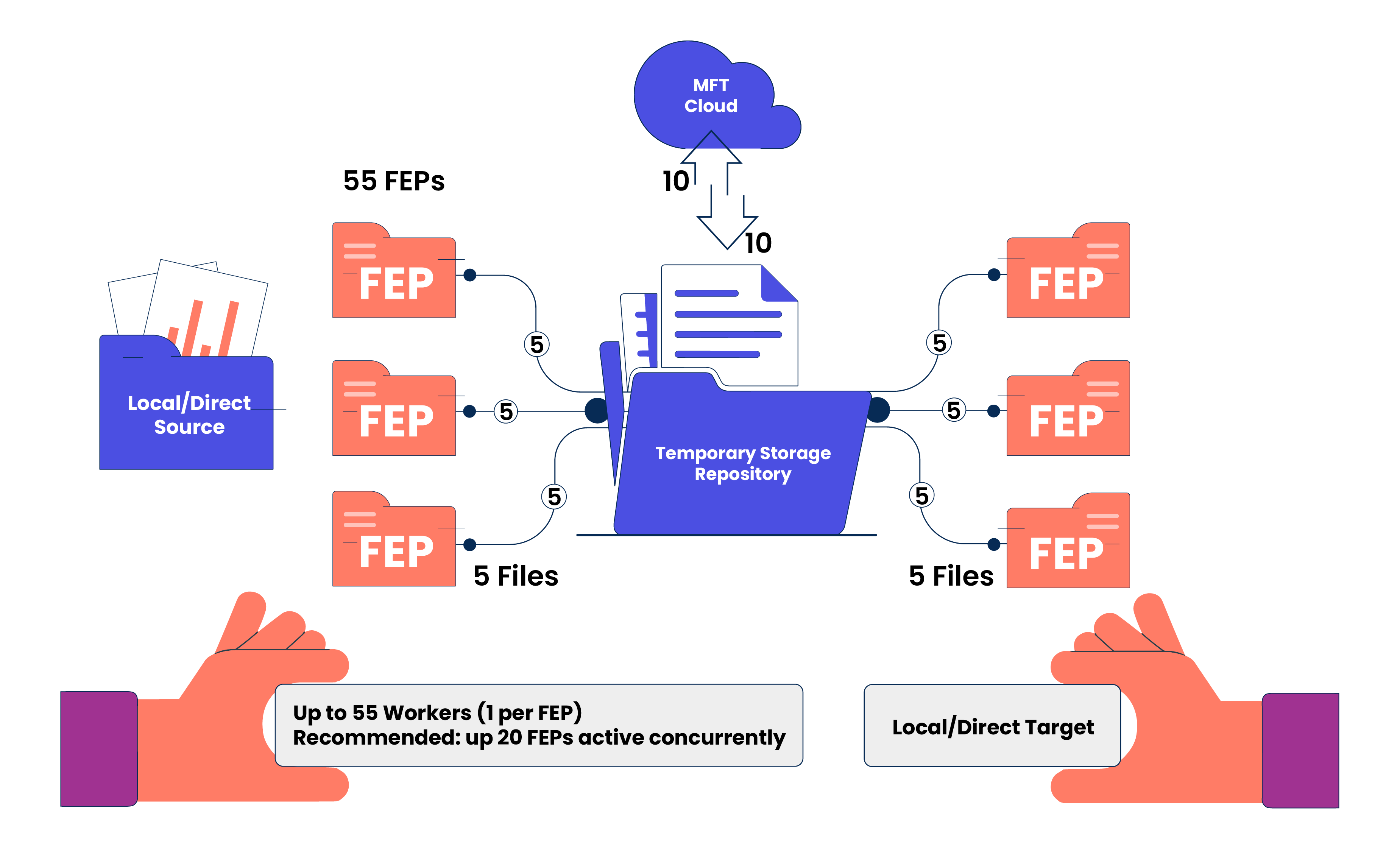
Concurrency is managed across different parts of the runtime's operations, from processing flows to transferring files. Here’s a breakdown of the new capabilities:
-
Flow Endpoint (FEP) workers - Each runtime can manage multiple flow endpoints simultaneously using dedicated workers.
- Maximum workers - A single runtime can run up to 55 workers, with one worker assigned to each FEP. This allows for up to 55 different flow endpoints to be executed at the same time.
- Performance recommendation - For balanced performance and resource utilization, we recommend running up to 20 active FEPs on a single runtime. For workloads exceeding this, deploying additional runtimes is the best practice to distribute the load effectively.
-
Cloud transfers - File transfers between the MFT Runtime and the MFT Cloud, which also orchestrates, manages, and compiles all transfer reports.
- Previous limit - 3 files concurrently (upload or download)
- New limit - 10 files concurrently (upload of download)
-
Local and direct transfers - File transfers between the runtime and various sources or targets.
- Local sources/targets - Internal network resources like network shares, internal FTP, or SFTP servers.
- Direct sources/targets - External endpoints such as cloud blob storage or external SFTP servers.
- Previous limit - 1 file at a time from a source and 1 file at a time to a target.
- New limit - Up to 5 files concurrently from a source and up to 5 files concurrently to a target.
| Transfer type | Previous concurrency | New concurrency |
|---|---|---|
| Runtime to/from cloud | 3 files | 10 files |
| Runtime from local/direct source | 1 file | 5 files |
| Runtime to local/direct target | 1 file | 5 files |
| Flow endpoint workers | 55 | 55 |
Managing concurrency
Primary control over the following settings is managed directly in the MFT portal:
-
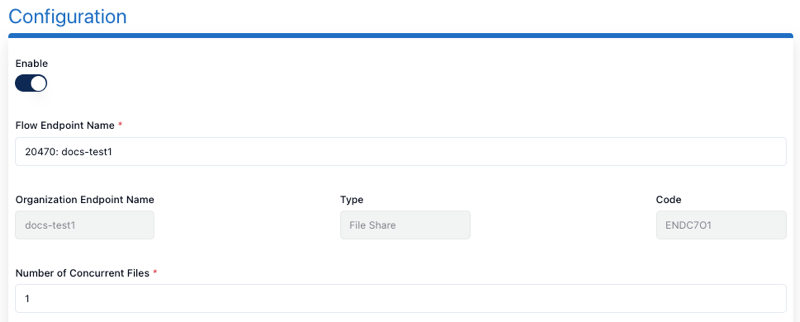
UI setting - Concurrency limits for file transfers can be configured within the Flow Endpoint settings. The runtime now adheres to this value.
-
Advanced configuration - For advanced users or specific override scenarios, these settings can also be manually adjusted in the appsetting.cfg configuration file.
