User roles
Four default user role templates are available:
- Instance Admin
- Instance User
- Org User
- Org Transfer
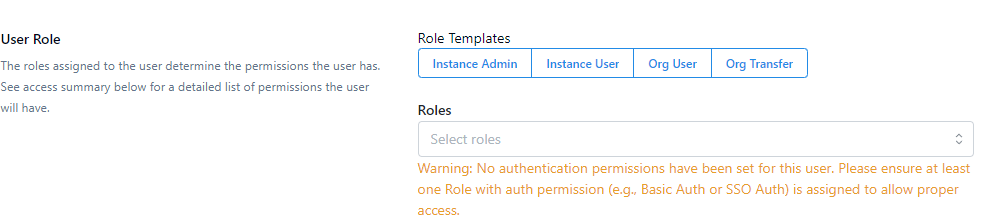
A user must be assigned at least one role with authentication permissions to ensure proper access to the system. Assign either role:
- Basic Auth - Basic Authentication Permission: Allows the user to authenticate using a username and password.
- SSO Auth - SSO Authentication Permission: Enables authentication via Single Sign-On (SSO) for streamlined access using organizational credentials.
- Both Permissions: A user can also be assigned both Basic Auth and SSO Auth permissions, providing flexibility to authenticate through either method. Ensure that at least one of these permissions is configured for each user to avoid access issues.
Org Transfer role
The Org Transfer user role is restricted to uploading and downloading files through the web portal, with access strictly limited to the scope of the organizations to which the user is assigned.
Key details of the Org Transfer user role:
-
Organization-Specific Access: Org Transfer users can be linked to one or more organizations, but can only upload or download files to flows within those associated organizations.
-
Portal Access: When an Org Transfer user logs into the portal, their access is limited to specific elements:
- File Upload Page: This displays a selection of flows from the associated organizations that are configured with a Manual Upload flow endpoint.
- Activity Page: Shows file activity within the associated organizations, including files available for download.
Security roles
User management offers two system security authentication roles for accessing the portal:
Basic Authentication (Basic Auth) Users with the Basic Auth role can log into the portal's front page using their username and password. This authentication method includes an optional multi-factor authentication (MFA) feature, providing an additional layer of security beyond standard credential verification.
Single Sign-On Authentication (SSO Auth) The SSO Auth role enables users to access the Thru portal through their organization's identity provider's single sign-on (SSO) system. This method allows seamless authentication by leveraging the customer's existing centralized authentication infrastructure, eliminating the need for separate portal-specific login credentials.
The roles are assigned to the instance users following these rules:
-
All users who exist in the system at the time of update are assigned both Basic and SSO Auth roles to ensure uninterrupted service, because prior to the update, the users could log in via the front page user/password and via Single Sign-on (SSO), if registered in the corporate Identity provider.
-
If required, an instance administrator can add a Basic Auth role assignment to such a user, which will allow both types of sign-in.
-
If an instance administrator creates a user manually via the administration portal, the administrator can select one or both roles, depending on the required type of user authentication.
