Setting the connector SDK location preference for Eclipse
After installing the Connector SDK Tools plug-in for Eclipse, you set the connector SDK location. After completing these steps, you are ready to create an Eclipse connector project.
About this task
The Boomi Connector SDK Tools plug-in adds a preference to Eclipse that specifies the location in which you installed the Connector SDK.
Procedure
-
In Eclipse, select Window > Preferences.
The Preferences dialog opens.
-
In the navigation tree, expand Boomi.
-
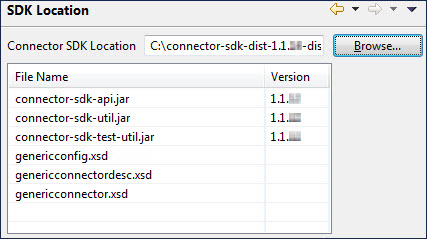
Select SDK Location.
The SDK Location section appears to the right.
-
Click the Browse button adjacent to the Connector SDK Location field.
The Browse for Folder dialog opens.
-
Navigate to the folder in which the Connector SDK is installed and select the folder.
-
Click OK.
The Browse for Folder dialog closes and you return to the Preferences dialog. The Connector SDK files are listed below the Connector SDK Location field.
-
Click OK.
