Installing the connector SDK tools for Eclipse
By installing the Connector SDK Tools plug-in for Eclipse, you have the tools you need to quickly set up Eclipse projects for your connectors.
-
In Eclipse, select Help > Install New Software….
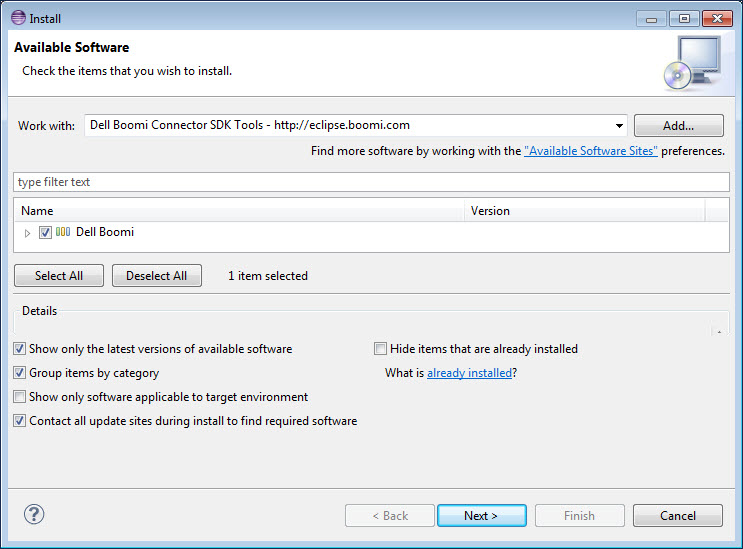
The Install wizard opens.
-
Click Add….
The Add Repository dialog opens.
-
In the Name field, type
Connector SDK Tools. -
In the Location field, type
http://eclipse.boomi.com.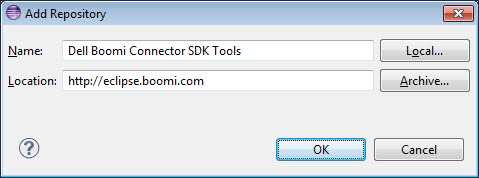
-
Click OK.
You return to the Install wizard. appears in the software list.
-
Select the Boomi check box .
-
Click Next.
The wizard advances to the Install Details screen.
-
Click Next.
The wizard advances to the Review Licenses screen.
-
In the License text box, read the Connector SDK Tools license agreement.
Note:
You cannot install the Connector SDK Tools unless you accept the terms of the license agreement.
-
Select I accept the terms of the license agreement.
The Finish button enables.
-
Click Finish.
If a security warning displays indicating that the authenticity or validity of the software cannot be established, click OK.
An alert box informs you that you must restart Eclipse for the installation to complete.
-
Do one of the following:
-
To complete the installation now, click Yes.
-
To wait to complete the installation until the next time you start Eclipse, click No.
-
