EDI profiles
An EDI profile defines the structure of an EDI document; its segments, data elements, loops, and options. Processes use the profile to read inbound EDI documents and to write outbound ones.
EDI documents use a structured format. A trading partner or EDI standard defines the rules, and the profile implements them. EDI formats are typically independent of a company's internal application systems.
note
The EDI profile is included in its own edition. To enable EDI, B2B, and trading partner capabilities in your account, contact your Boomi representative.
Core components
| Term | Definition |
|---|---|
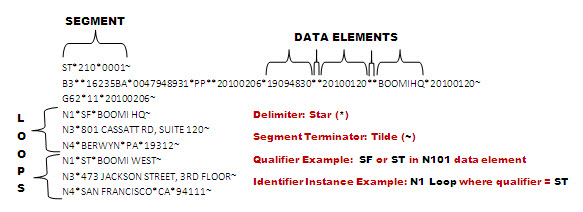
| Segment | A row of business data, grouped with one or more data elements. |
| Data element | A single fact, stored as a value. |
| Delimiter | The character that separates data elements. |
| Segment terminator | The character that marks the end of a segment. |
| Qualifier | A predefined value of a data element that classifies key data. |
| Loop | A group of segments that can repeat within one document. |
| Instance identifier | A flag that identifies a specific data set by occurrence, qualifier, or both. |
The EDI profile supports repeating data sets (loops), and you can organize segments into header, detail, and summary sections.
Where to start
| Goal | Topic |
|---|---|
| Create a profile | Creating an EDI profile |
| Choose a standard, version, and delimiters | EDI standards Configuring standard and file options |
| Add segments from a standard | Importing segments into an EDI profile |
| Edit the structure | Adding or deleting segments, loops, and elements Reordering segments, loops, and elements |
| Tell repeated segments apart | Instance Identifiers Adding qualifiers to a data element |
| Write HL segments automatically | Auto-generating options |
| Validate segments | Validation rules |
| Use HL7 composites as a tree | Enhanced composites |
