OpenAPI connector
The OpenAPI connector allows you to connect to, and perform actions and operations on RESTful APIs.
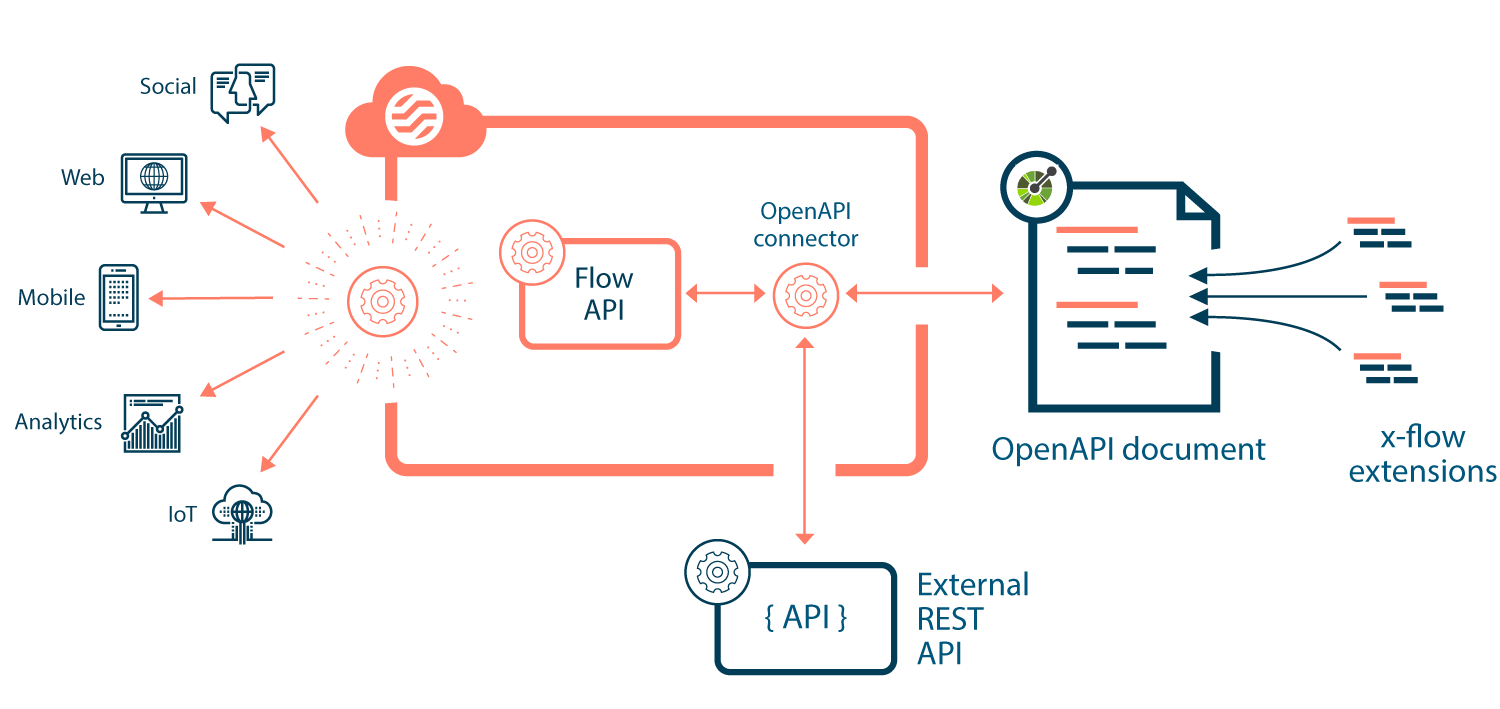
OpenAPI connector
OpenAPI connector uses the OpenAPI configuration screen to guide you through configuring an OpenAPI request. For more information, refer to Open API Connector.
OpenAPI (legacy) connector
The OpenAPI (legacy) connector requires a YAML formatted OpenAPI specification document, that enables to communicate and integrate with your chosen API. You can add x-Flow extensions to this document schema, to provide hints for the endpoints that provide create, update, and delete (CRUD) operations, mapping the data format for API requests/responses between the API and Flow.
Prerequisites
The OpenAPI connector requires the following:
- An OpenAPI document adhering to version 3.0 and greater of the OpenAPI specification.
Using the OpenAPI connector requires the following:
-
Basic knowledge of RESTful APIs.
-
Basic knowledge of the OpenAPI specification API description format for RESTful APIs.
-
Basic knowledge of working with OpenAPI documents using YAML.
To build flows and connect to your OpenAPI document, you should also have a good understanding of and experience with the following concepts and features:
-
Installing/configuring connectors.
-
Building flows and using database load, database save, and database delete steps to interact with a data source/connector.
The following known limitations affect the OpenAPI connector.
Getting started with the OpenAPI connector
The typical steps involved in using the OpenAPI connector are as follows:
-
Install the OpenAPI connector in your tenant, defining configuration values as required.
-
Configure Open API connector for Flow to create Types that work with the specified OpenAPI schema.
-
Once you complete the connector configuration with the OpenAPI settings, you can use the configured connector with the OpenAPI step.
Getting started with the OpenAPI (legacy) connector
The typical steps involved in using the OpenAPI (legacy) connector are as follows:
-
Create/download a YAML formatted OpenAPI specification document for the RESTful API that you wish to connect to. Most APIs provide a sample OpenAPI document that can be used as an initial template.
The OpenAPI document and schema defines how the connector can integrate with your chosen API. The connector uses the document specification to understand how to interact with the API.
-
Modify the OpenAPI document as required, for example by adding extensions to integrate operations with the API.
-
Host the OpenAPI document, for the connector to use when communicating with the API.
-
Install the OpenAPI (legacy) connector in your tenant, defining configuration values as required, such as the location (URL) of your hosted OpenAPI document.
-
Build your Flow, using the OpenAPI connector to integrate with the API as required, for example by using database save, load, and delete steps to perform CRUD operations on the API data source.
Response examples
Response examples can be added to parameters, properties, and objects in your OpenAPI document schema so that responses can be obtained with the connector that are based on examples in the document schema, without actually having to retrieve response data from an external API.
Worked example
Refer to the Boomiverse article Getting started with the OpenAPI Connector in Boomi Flow for a worked example of how to use the OpenAPI Connector to connect to a public API.
Connector URL
The OpenAPI connector endpoint URL is:
1flow://openapi
