Email Deprecated connector
This connector is now in Deprecated status. It is no longer available for new users and is not actively maintained. We will provide a minimum six-month notice before its retirement. We recommend upgrading to the newer supported version of this connector.
The Email connector allows you to connect to an email provider and send emails directly from a Flow.
The connector is most commonly used to integrate email feature so that simple asynchronous emails can be configured and triggered to send at defined points within a Flow. 
The connector can also be used as part of a Flow approval process, by sending synchronous emails that require a decision from an email recipient before the Flow can continue progressing along the chosen outcome path. 
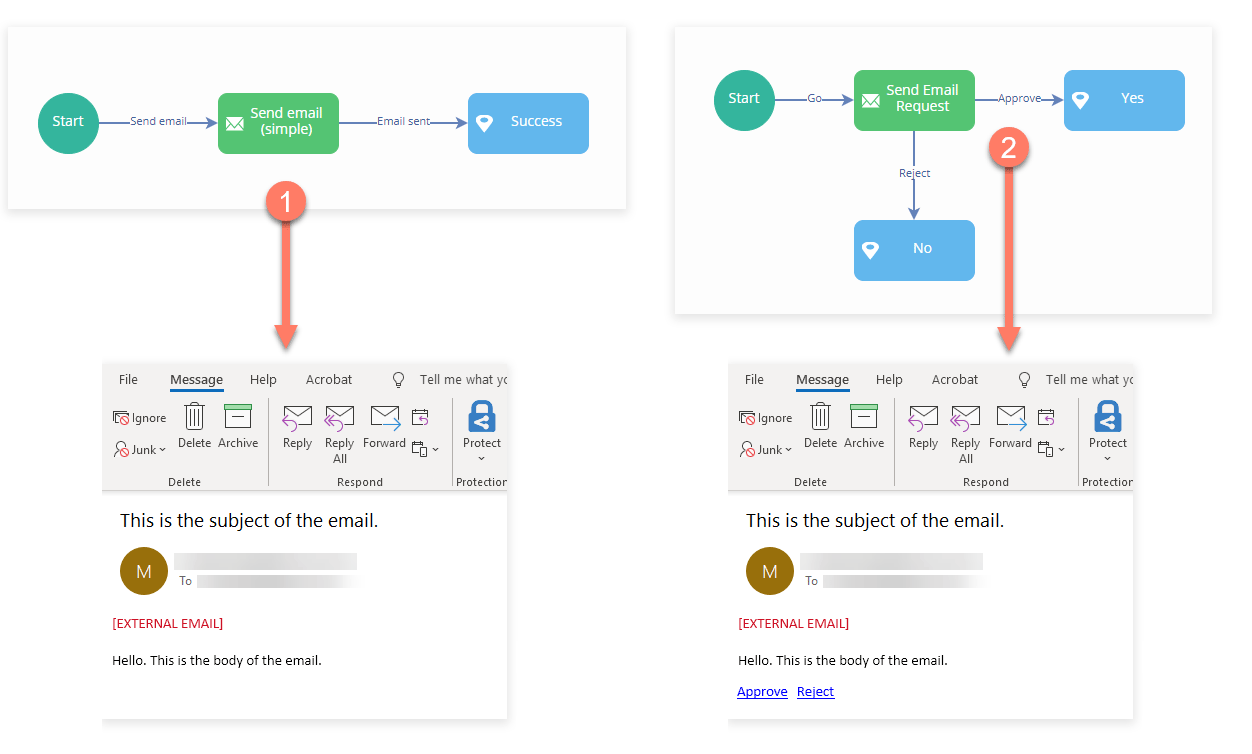
To use it, you must first install the connector into a tenant and configure it. It can then be imported into a Flow as a shared step.
The configuration values for the connector will depend on your email provider. For example, to send emails from a Gmail account you will need to configure the connector with a different SMTP server name than if you are sending emails from a Microsoft Exchange/Office 365 account.
Message actions and send types
Once installed and imported into a Flow, the connector can be integrated using a message step and message action.
There are several different types of message action available for the connector:
Worked examples
To get started using the connector, the following worked examples are provided:
URL
The endpoint url is: https://services.manywho.com/api/email/1
Features
The connector forms part of the following features:
-
Files: This feature allows you to expose files stored in an external repository from within your flows. This also allows users to upload and manage files through flows.
-
Messages: This feature provides the ability to interact with the connector using Message Steps.
Known limitations
-
Although the connector can be integrated with a File Upload Component to allow a user to upload and send a file as an email attachment, the file attachment is a temporary resource in the connector. The connector is not designed for permanent file storage.
To store files that are attached to emails sent with this connector, use a dedicated file storage such as the Amazon S3 connector. Refer to Sending email attachments using the Email connector.
