Detecting the correct CSS style
The content on this page is outdated and will not receive updates. For the most up-to-date feature, refer to Setting up and managing flows.
Learning how to detect and identify the CSS style you should target is a fundamental skill required for using CSS to customize your flows.
Overview
Although the CSS reference outlines the main CSS styles within , you may need to target specific, more complex CSS selectors that are not detailed in the reference.
This process is made easier by using a browser CSS inspector tool, such as the 'Google Chrome Dev Tools' console in Google Chrome (right-click a web page and select Inspect). These tools allow you to identify exactly which CSS styles you need to target and override when developing your custom CSS styles.
A worked example
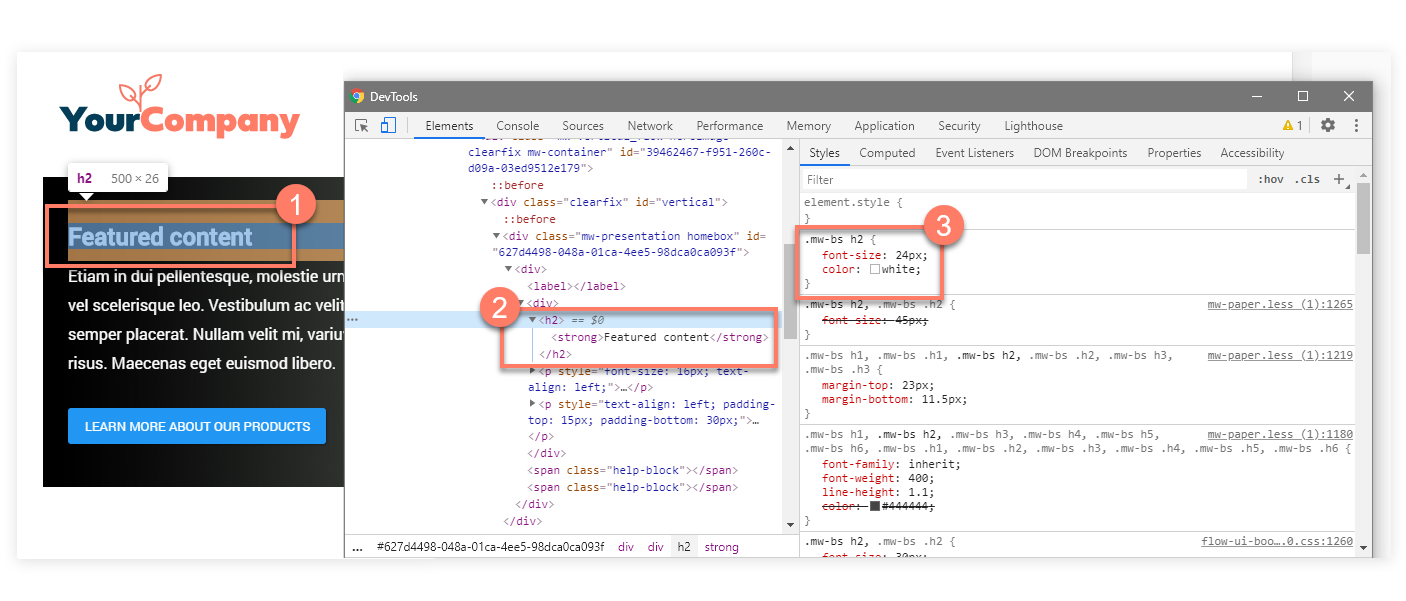
In the following example, a Flow running the default legacy player is inspected in Google Chrome:
-
A heading is inspected in the Flow web application, identified as an 'H2' (heading 2) element.

-
The HTML for the element is shown in the Elements console.

-
The classes that are applied to the element are shown in the Styles panel, showing that the '
.mw-bs h2' CSS selector is what you should target in a default legacy player if you wish to override the style of all second-level headings in the Flow.
Additional resources
The following links provide more information on using common web browser developer tools:
