Flow and Integration
Flow applications can be integrated with Integration, allowing access to the full range of connectors and applications supported by Integration and the Boomi Enterprise Platform.
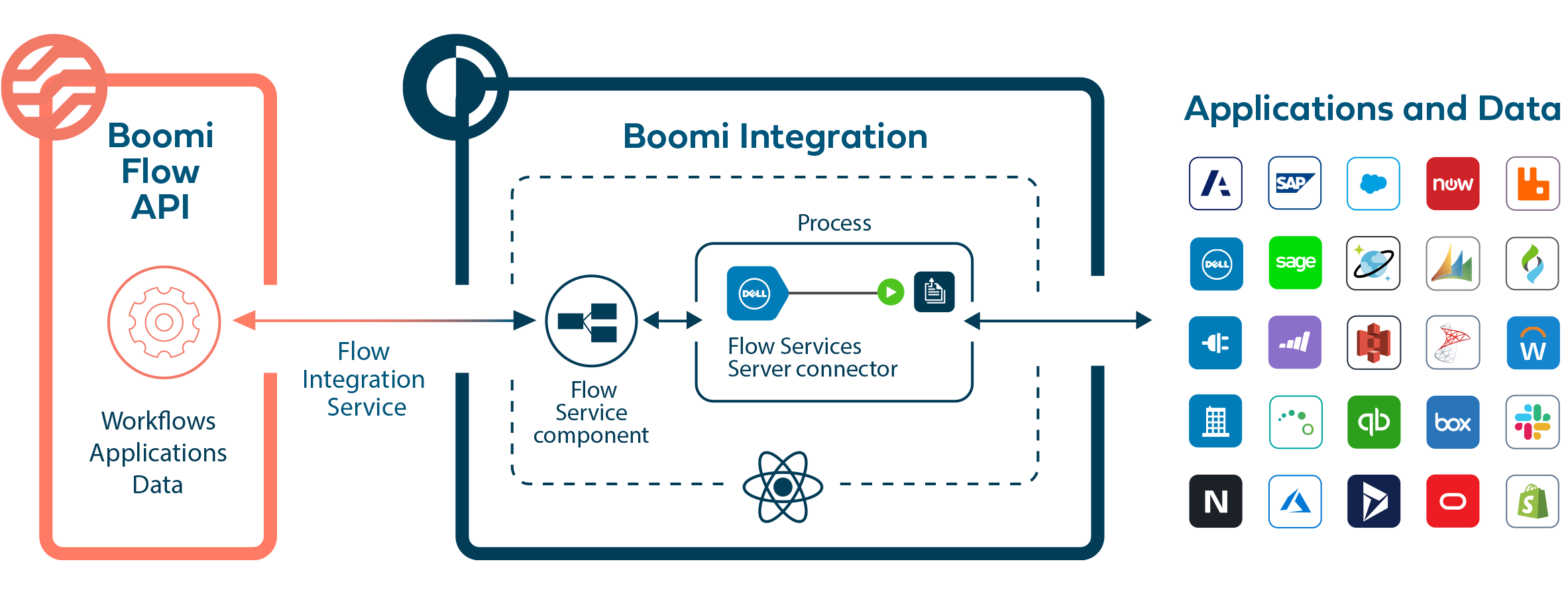
The Boomi Flow Services Server (FSS) in Integration allows Flow applications to connect to and exchange data with the Integration platform, using Integration connectors hosted on a Boomi runtime, or in the public runtime cloud. Installing a Flow Integration Service in a Flow tenant allows Flow to use an Integration process to connect to and interact with other systems and applications.
Connection overview
Connecting Integration to Flow typically uses the following elements:
-
Flow Service component
-
Boomi Flow Services Server connector
-
Boomi Integration Service connector
-
Boomi Flow Client connector
An example workflow for using Integration with Flow is provided to illustrate the different concepts and features that may be required when configuring Flow and Integration to work together.
Flow Service component
A Flow Service component is set up in Integration to build and manage the connection to Flow. This component is used to implement the callback logic required to continue Flow progression once the integration process completes. Timeouts are managed by returning wait responses to Flow while a process executes.
Boomi Flow Services Server connector
A Boomi Flow Services Server connector is set up in the start step of an Integration process to listen for requests from Flow. Flow connector requests originate in flows as REST requests.
When a process using this connector is deployed to a basic runtime, the internal Flow Services Server listens for Flow connector requests based on the configurations made in the Flow Services Server operation.
Integration profiles are used to specify the structure of the data that is processed, and should be configured with an understanding of how profiles relate and map to types in Flow.
Boomi Integration Service connector
The Boomi Integration Service connector is installed in Flow, to allow your flows to connect to and interact with the Flow Service component in Integration.
Flow Client Connector
As well as the more commonly used Flow Services Server connector above, a Flow Client connector is also available for use in processes, in order to launch and execute flows. This connector needs to be configured with relevant Flow information such as the tenant id and Flow user credentials.
