MongoDB basic connection
Before retrieving your connection string, ensure your MongoDB Atlas instance is accessible to Data Integration. For more information, refer to selecting connection methods, such as Private networking, SSH tunnel, reverse SSH tunnel, and VPN.
Establishing a connection
- Navigate to the Data Integration Console.
- Click Connections and select + New Connection.
- Choose MongoDB.
- Enter a Connection Name.
- Configure the Host, Port (default: 27017), and Database.
note
The database name must be in lowercase.
- Enter your Username and Password.
- Specify your URI.
- Click Test Connection to verify your credentials.
- Click Save to save your connection.
URI Connection
Use the standard MongoDB Uniform Resource Identifier (URI) format to connect to a MongoDB deployment, including standalone instances and replica sets. For more information on configuring your URI, refer to the MongoDB URI MongoDB URI topic.
You can configure the URI connection by clicking the input field, entering the URI, and then clicking outside the field to save your changes.
-
MongoDB must run on a Standalone or a Replica set.
- If you are using a Replica Set, you must add it in the connection URI. For example.
-
Ensure to explicitly mention all nodes in the connection URI.
-
If you are using Log-Based with MongoDB Atlas, leave the analytics node out of the connection URI.
-
Data Integration supports connecting to a Primary node in MongoDB Atlas.You can connect to the Analytics Node, but cannot get any messages from it due to Atlas's implementation.
For example:
mongodb://Cluster83621:<db_password>@cluster83621-shard-00-00.oxr5h.mongodb.net:27017,cluster83621-shard-00-01.oxr5h.mongodb.net:27017,cluster83621-shard-00-02.oxr5h.mongodb.net:27017/?ssl=true&replicaSet=atlas-2ymdg4-shard-0&authSource=admin&retryWrites=true&w=majority&appName=Cluster83621
SSL (optional)
A Secure Sockets Layer (SSL) certificate is a digital certificate that verifies identities and enables secure communication between servers. Although the use of an SSL connection is optional, some Mongo database hosts may require an SSL certificate to validate and enable the connection.
You must upload an SSL certificate, and use the Allow Invalid Certificate/Hostnames options to bypass hostname validation checks.
SSH (optional)
Secure Shell Protocol (SSH) provides secure and encrypted access to internal databases from Data Integration servers to retrieve data.
Configure your SSH Tunnel server in your network to use SSH Tunneling via Data Integration. This server can connect to your database server via the internal IP address or address, and accepts SSH connections from Data Integration IP addresses. Data Integration uses a key file to connect to the SSH server.
After setting up SSH tunneling, create a Seed List connection address.
MongoDB seed list connection address
MongoDB introduces the concept of a Seed List, which you specify using SRV and TXT records. When connecting to a MongoDB replica set, the client must specify at least one replica set member; this lets you connect to a replica set even if one of the nodes specified by the client is unavailable.
The use of SRV records eliminates the requirement for each client to provide a complete set of cluster state information. Instead, a single SRV record identifies all cluster nodes (along with their port numbers), and a TXT record defines the URI. To create an SRV and TXT Records, refer to the MongoDB - Connect to an Atlas Cluster topic.
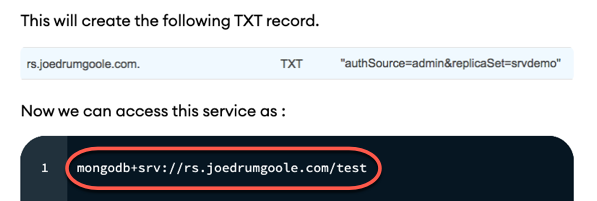
Paste it into the Connection URI and create the SSH tunnel connection to activate the Data Integration SSH Tunnel connection.
- You cannot use an SSH Tunnel connection with more than one host unless you configure the SRV and TXT Records.
