Data Hub: CDC flow set up
This guide describes how to configure Change Data Capture (CDC) between Boomi Data Hub (producer) and Boomi Data Integration (consumer) using Boomi Event Streams.
The Data Hub source connector is available as a limited availability (Beta) release.
With CDC, Data Hub publishes golden-record changes to Boomi Event Streams, and Data Integration consumes them as they occur. This replaces the legacy batch staging-queue path and reduces latency from minutes-to-hours to sub-second.
Setup has two stages: you configure Data Hub and Event Streams once per repository so Data Hub can publish changes, then you create the connection in Data Integration so it can consume them.
For connection field reference, refer to Data Hub connection. For standard (non-CDC) extraction setup, refer to Data Hub walkthrough.
Setting up Data Hub and Event Streams (one-time)
Creating the Event Streams token
- Use the service switcher at the top right of the platform and go to Services > Event Streams.
- On the Environments dashboard, click View Details next to the target runtime environment (for example, Atom Prod Cloud).
- Open the Settings tab.
- Scroll to the Tokens section and click + Create a Token.
- Configure the token:
- Name: a unique name, for example
DataHub_Outbound_Token. - Expiration Date: a policy-compliant expiry date.
- Authorizations: select both Produce and Consume. Data Hub needs Produce authorization to publish messages, and Data Integration's consumer needs Consume authorization to read them using the same token.
- Name: a unique name, for example
- Click Save, then immediately copy the generated token string. You enter this same value in the JWT token field when you create the connection in Data Integration.
Treat this token like a password. It is not displayed in full again. If it is lost, create a new one and bind it to the repository again.
Binding the token to the Data Hub repository
- Switch services to Data Hub.
- Click Repositories in the left menu and open the target repository.
- Open the Configure tab.
- Find the Event Streams Environment Token field and click Edit (or Add if it is blank).
- Paste the token you created in the previous step.
- Click Save. The platform validates the token signature and binds the connection.
Make sure your target Universe model is already published and deployed in this repository. You do not need to change the model's delivery mode or perform any other setup in Data Hub. When you activate a data flow with CDC enabled, Data Integration automatically creates the listener source, attaches it to your deployed model, and resolves the streaming topic. Refer to How CDC activation works.
Topic creation: The underlying streaming topic name is an internal implementation detail. You never see or enter a topic name anywhere in this setup. Data Integration resolves and creates it automatically, from the Repository ID and the other CDC credentials you provide, when you activate a data flow with CDC enabled.
Creating the connection in Data Integration
- In Data Integration, create a new Data Hub connection.
- Fill in the standard Data Hub fields (below). These are required whether or not CDC is used.
- Turn on Enable CDC Connectivity (Events Stream). Four additional fields appear.
- Fill in the CDC fields.
- Click Test Connection and resolve any errors before saving.
- Click Save, then build the data flow, select your models, and activate. Refer to Data Hub walkthrough for the data flow steps.
When the toggle is off, the connection applies to standard extraction only.
Standard fields (required)
| Field | Description |
|---|---|
| Base URL for API Requests | The Hub Cloud region for your repository, selected from a dropdown. This same selection also determines the Event Streams host used for CDC, so choose the value that matches both your Data Hub repository and your Event Streams environment. |
| Username | Your Boomi Account ID, in the format <account>.<user>, from the repository Configure tab. |
| My Hub Authentication Token | The per-repository secret token, from the repository Configure tab. |
CDC fields required when Enable CDC connectivity is on
- JWT token: The token you created in Creating the Event Streams token, with both Produce and Consume authorizations.
- DataHub API Key: A secret key required in addition to the My Hub Authentication Token above.
- Repository ID: The identifier of the Data Hub repository this connection targets. This is a required value you enter directly; it is not derived from the My Hub Authentication Token. Data Integration uses it to attach the CDC listener source to your repository during activation.
- Account Email: The email address associated with your Data Hub account.
Data Integration does not ask for a separate Event Streams Environment ID, region or API host selector, or topic name for CDC. Only the four fields above are required, and the Base URL for API Requests dropdown determines the Event Streams host as well as the Hub host.
Test Connection
Test Connection is read-only: it never creates, attaches, or modifies a Data Hub resource. With CDC on, it performs three checks:
- Calls the Data Hub Repository API to confirm your Base URL, Username, and My Hub Authentication Token are valid and the repository is reachable.
- Decodes the JWT token locally (no network call) and confirms it contains the claims Data Integration needs.
- Confirms DataHub API Key, Repository ID, and Account Email are present. It does not validate their values.
Test Connection never contacts Event Streams, the underlying message broker, or the Platform API, and it does not resolve or check the streaming topic. A successful Test Connection with CDC enabled confirms your Data Hub credentials and JWT token are usable, but it does not guarantee CDC will activate: the DataHub API Key, Repository ID, and Account Email values are first exercised when you activate the data flow.
Common setup errors
| What you see | Cause | Fix |
|---|---|---|
| CDC requires Event Streams URL and Token. | CDC toggled on with fields left blank | Complete the CDC fields. |
| Topic not found or access denied. | The Repository ID, JWT token, or DataHub API Key is incorrect. This does not surface during Test Connection; it appears when the data flow activates and Data Integration attempts to resolve and attach to the topic. | Re-check the Repository ID and CDC credentials on the connection. |
| Insufficient permissions: token must include consume. | The JWT token lacks the required Consume authorization. This does not surface during Test Connection; it appears when Data Integration's consumer attempts to read from the topic. | Recreate the token with both Produce and Consume authorizations and bind it to the repository again. |
| Deployment blocked in Data Hub | The repository has no Event Streams Environment Token | Bind the token to the repository before deploying the model. |
How CDC activation works
When you activate a data flow with CDC enabled, Data Integration automatically provisions everything needed to stream from Data Hub.
- Creates a listener source scoped to this data flow.
- Attaches the source to your deployed Universe model.
- Imports the model's domain source configuration.
- Resolves the underlying channel.
- Reconstructs the streaming topic name.
Data Integration never converts, upgrades, or otherwise modifies your model.
Each of these provisioning steps is idempotent: reactivating the same data flow does not create duplicate sources or topics.
If you promote a data flow to a different environment, it gets a new source and connector. The original source is not cleaned up automatically and remains on your Data Hub account after promotion.
CDC event contract
Data Hub delivers changes as XML messages wrapped in a realTimeDeliveryMessage envelope:
| Field | Meaning |
|---|---|
recordId | Stable identifier of the golden record. |
recordVersionId | Monotonic version number of the golden record. |
opType | CREATE, UPDATE, or DELETE. |
recordUpdatedAt | Timestamp of the change at the source. |
createdAt | Timestamp the event was created. Refer to Expected behavior below. |
channelUpdateType | FULL (entire record). This is the only value Data Integration supports. |
record | The golden record payload, wrapped by the model's root element. |
Data Integration only supports a channelUpdateType of FULL. If Data Hub is configured to send DIFF (changed fields only), Data Integration cannot parse the message. This is a deliberate hard failure: streaming stops rather than applying a partial record. Configure the channel to send full records.
CREATE, UPDATE, and DELETE map to insert, update, and delete in your target. An unsupported operation does not fail the data flow. The event is logged and triggers an internal alert; it is not counted and is not shown in your data flow's run.
Event Streams enforces a maximum message size of 1 MB. Delivery is at-least-once, so the same event can arrive more than once, for example after a restart. With Merge loading and a stable primary key, your target holds exactly one correct row per record; in Append mode, or with no primary key, duplicates are possible.
CDC streaming start position
There are two start modes. There is no start from the oldest message mode.
| Automatic | Re-initial sync | |
|---|---|---|
| Start position | Resumes from the last committed offset | Starts from now |
| When it applies | Every run of an already-running data flow. It restarts, redeploys, or resuming after a pause | First activation, an explicit re-sync, or backfilling a newly added column |
| Historical data | Continues from where it stopped; nothing is skipped | Comes from the initial load (migration), not from the stream |
| Existing target data | Preserved | Reloaded by the accompanying migration |
If the stored offset is no longer available, the data flow fails with an error telling you a re-initial sync is required, rather than silently restarting from now.
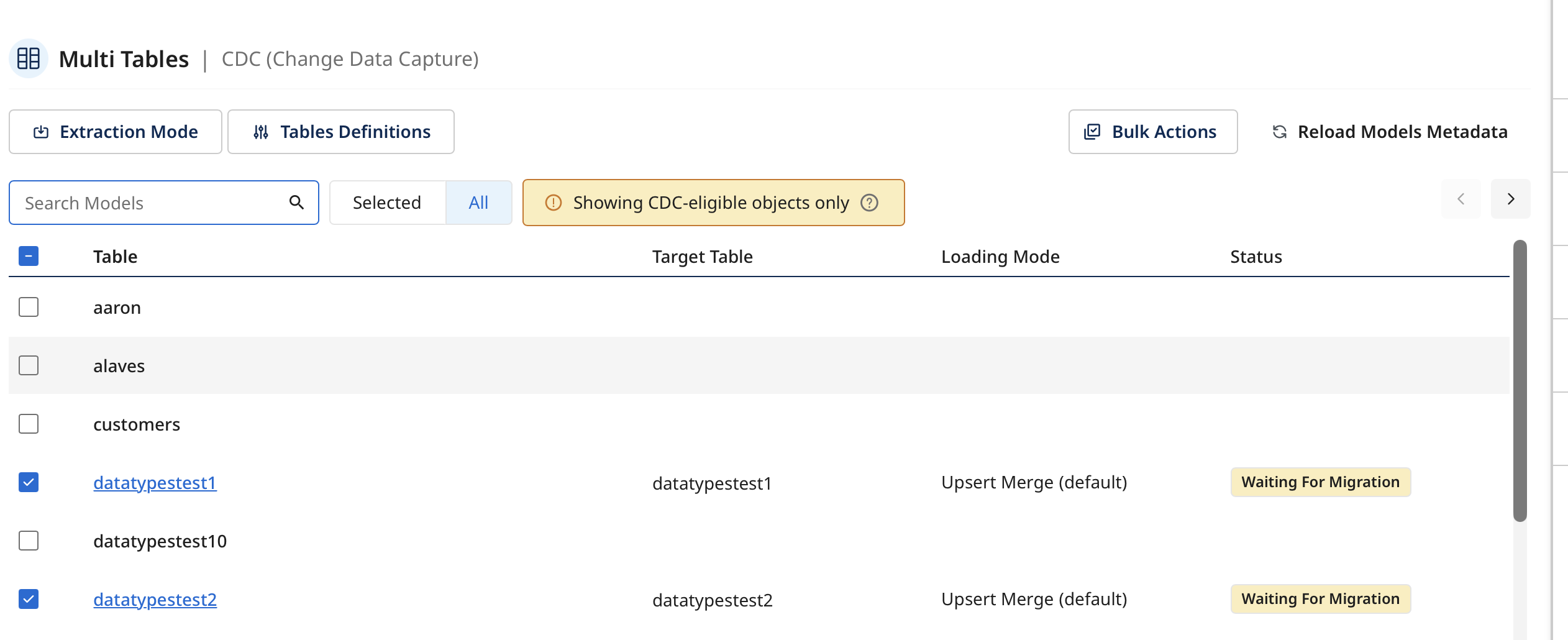
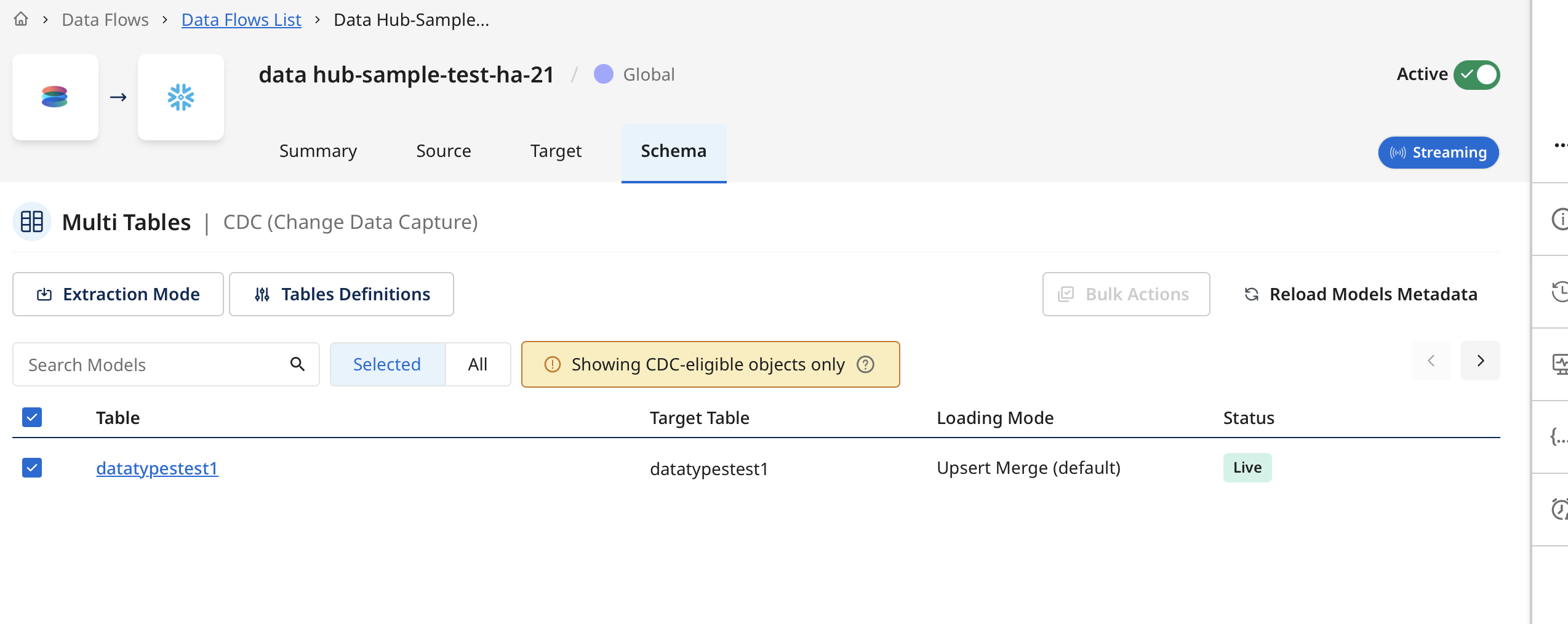
In the Schema tab, a table's Status column shows Waiting For Migration while the initial load is in progress, then changes to Live once the table has switched over to streaming.
CDC schema evolution
Data Integration absorbs Data Hub schema changes while your data flow keeps running:
| Change in Data Hub | Target action | Rows already landed | Re-sync needed |
|---|---|---|---|
| Field added | Column added to the target | Kept; new column is null | No |
| Field removed | Column retained, no longer populated | Preserved; new rows carry null | No |
| Field renamed | Treated as remove + add | Old column preserved; new column starts null | No |
| Type widened compatibly (for example, int to bigint) | Column altered in place | Preserved | No |
| Type narrowed or incompatible (for example, string to int) | That model is blocked | Preserved, untouched | Yes |
| Model added to or removed from the flow | Table added or removed | Other tables unaffected | No |
The merge key for a Data Hub CDC source is always recordId. Changing a model's own primary key in Data Hub has no effect on how Data Integration merges records.
A newly added column reads null for every row landed before the column existed. Data Hub does not resend history, so only a re-initial sync backfills those values.
Data Hub infers a field's type from sampled record values rather than a declared schema. If every sampled value for a newly added column is null, Data Hub reports no type, and the column is coerced to STRING in your target regardless of the type declared in the model.
Where a change cannot be handled safely, only the affected model is blocked. Other models in the same flow keep streaming.
Expected behavior: golden-record metadata fields
The Data Integration target writes the complete record on every change, built entirely from the event-stream message. There is no merge with prior state. This makes the following field behaviors important to understand.
Record creation date
createdAt on a CDC message is the time the event was created, not the time the golden record was created. recordUpdatedAt is the time the record itself was last updated. Because Data Integration writes the full record on every change, the value landed in your target is taken from the event and reflects the update time. A record created months ago but recently updated shows the recent date in your target, even though the Data Hub Repository API still returns the original creation date for that record.
Use recordUpdatedAt, not createdAt, to reason about when a record changed. The original golden-record creation date is available from the Data Hub records query API, not from the CDC stream.
Record title
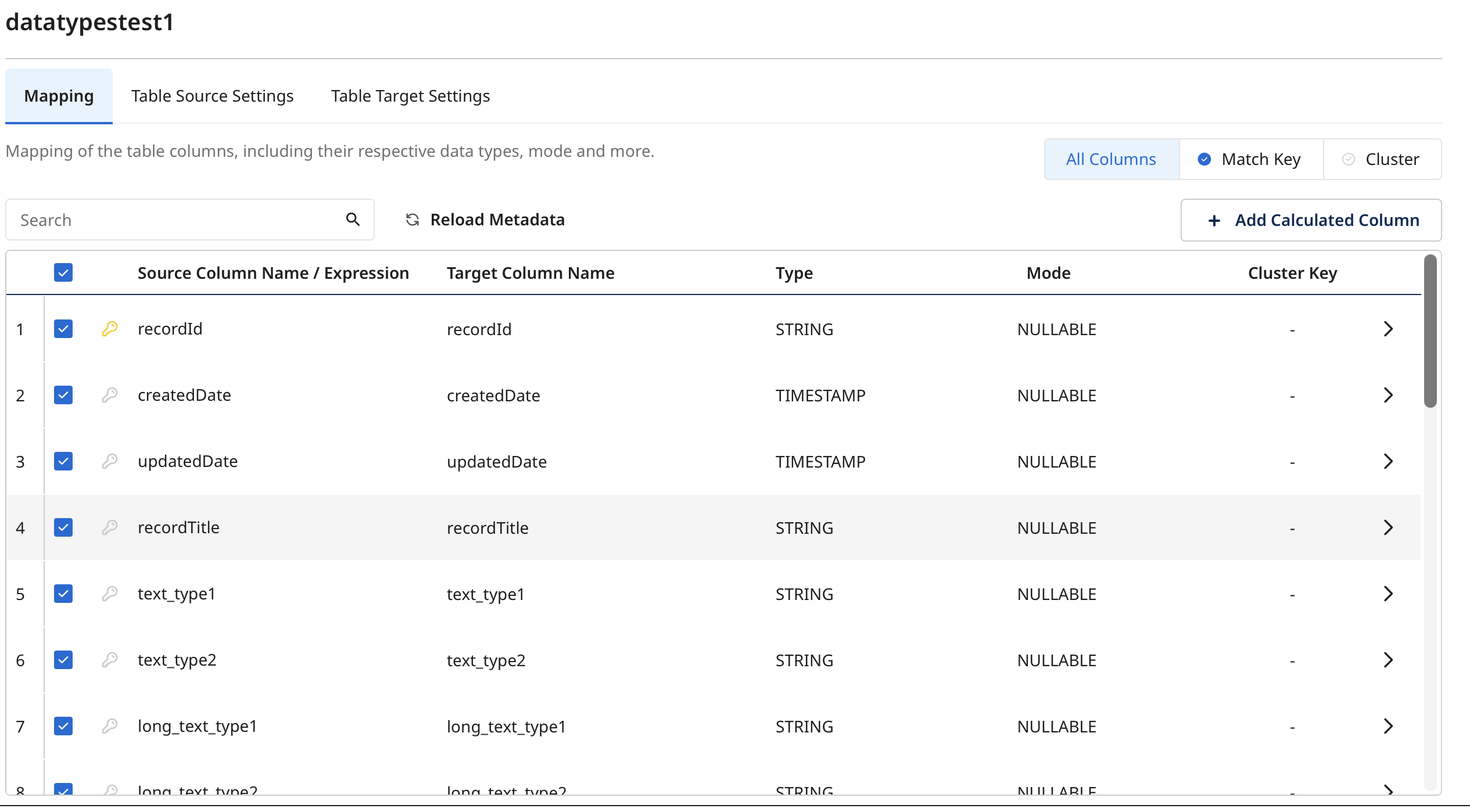
recordTitle is not delivered through the Data Hub source connector, in either standard extraction or CDC. This is by design: a record title can contain a field value that was deliberately excluded from a source's delivery configuration, so Data Hub disallows recordTitle in delivery by default. If you need a record title, derive it from the model fields the connector already delivers.
Record identifier: recordId versus id
In CDC, use recordId, which is the top-level identifier on the message envelope as the golden record identifier when mapping to a target identifier column. The id element inside the record payload itself is not delivered in either extraction mode, because it is not visible to Data Integration's metadata discovery. recordId is present and consistent in both standard extraction and CDC.
For a source that only reads from Data Hub, recordId is the golden record identifier and mapping it to your target's identifier column covers the need completely. For a source that also contributes to the golden record, recordId is still the golden record identifier, not the identifier that source itself contributed. That value is available separately in Data Hub and is not part of this connector's delivery.
Summary
| Field | Standard extraction | CDC |
|---|---|---|
| Golden record creation date | Available from Data Hub | Not available. createdAt is the event time |
recordTitle | Excluded | Excluded |
id (record payload element) | Not delivered | Not delivered |
recordId | Available | Use this as the identifier |
CDC errors and edge cases
| Scenario | Behavior |
|---|---|
| CDC enabled without Event Streams URL and token | Activation blocked; invalid fields are focused |
| Invalid or missing topic | Activation blocked |
| Token lacks consume permission | Activation blocked |
| Non-XML payload received | Data flow fails |
channelUpdateType of DIFF received | Data flow fails; Data Integration only supports FULL |
| Unsupported operation received | Event is logged and triggers an internal alert. Not counted, not shown in the run |
| Schema change that cannot be handled safely | Only the affected model is blocked; other models keep streaming |
| Offset no longer available | Data flow fails; a re-initial sync is required |
Known limitations
- The golden record's original creation date is not carried over the CDC stream.
createdAtreflects the event time, not the record's creation time. recordTitleis not available through the connector in either extraction mode.- Only a
channelUpdateTypeofFULLis supported. A channel configured to sendDIFFcauses the data flow to fail. - A newly added column reads null for history; only a re-initial sync backfills it. Depending on how source metadata is refreshed, a newly added field may not reach the target until you reload metadata from the Source tab.
- Data Hub infers column types from sampled record values. If every sampled value for a new column is null, Data Hub reports no type, and Data Integration coerces the column to STRING, regardless of the type declared in the model.
- A removed field's column is retained, not dropped, and simply stops being populated.
- After promoting a data flow to another environment, the original Data Hub source remains on your account and is not cleaned up automatically.
- Maximum message size is 1 MB per event.
- Delivery is at-least-once; duplicates are possible and are resolved by Merge loading with a stable primary key.
