AWS Billing walkthrough
AWS Billing and Cost Management API Version 2 is currently supported.
AWS Billing and Cost Management is a web service that lets you pay your invoices and manage your expenses.
Connection
- To connect AWS Billing with your destination, follow these steps.
- Choose a Source Connection after you have created a connection.
Reports
In AWS Billing, there are two types of reports available:
- Predefined Reports
- Custom Reports
Predefined reports
Refer to AWS Billing predefined reports for more information.
Custom reports
Create custom reports, and select a specific report to pull data from AWS Billing after establishing a connection.
- Each report requires incremental data extraction by choosing a Date Range and Time period.
-
Start Date is mandatory.
-
You can retrieve Data for the date range specified between the start and end dates.
-
If you leave the end date blank, Data Integration pulls the data at the current time of the Data Flow's run.
-
Dates timezone: UTC.
-
Use the Last Days Back For Each Run option to gather data from a specified number of days before the selected start date.
- Dimension Filters are available for use on each report.
Each option applies a different dimension to the data pulled. Access topics on each dimension on the AWS webpage.
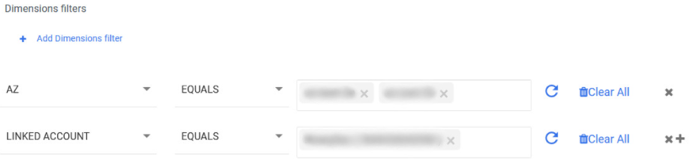
- You can also select from the following options for all reports other than Cost Categories:
- Granularity: It establishes the time frame in which Data Integration splits your response.
Retrieving the last 14 days of Hourly granularity is possible.
- Metrics: It sets the metrics returned in the query. To learn more, refer to the Blended Cost metric.
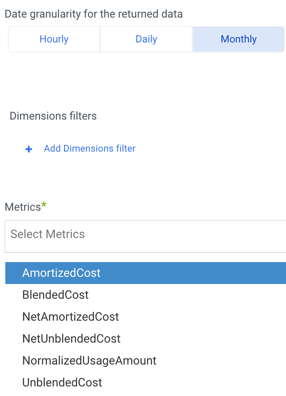
- You can group your cost and usage data using the following Group By options:
- Group By Dimension: Groups results by a predefined AWS dimension, such as
LINKED_ACCOUNT,SERVICE, orREGION. - Group By Tag: Groups results by a user-defined AWS tag key, such as a cluster name, environment, or team name. You can combine Group By Tag with Group By Dimension to analyze costs across multiple grouping criteria.
- Group By Dimension: Groups results by a predefined AWS dimension, such as
Tag keys are user-defined in your AWS account. Enter the tag key name exactly as it appears in AWS. If you have not configured tags in your AWS account, the connector returns no results.
