Viewing the Bundle install history
Updated 27 April 2026
The Install History is a record of all asset and bundle installation events in your account, including the timestamp of each install, the user who performed it, and the original install location. The install location is the specific workspace or area within the Boomi platform where an asset was originally installed.
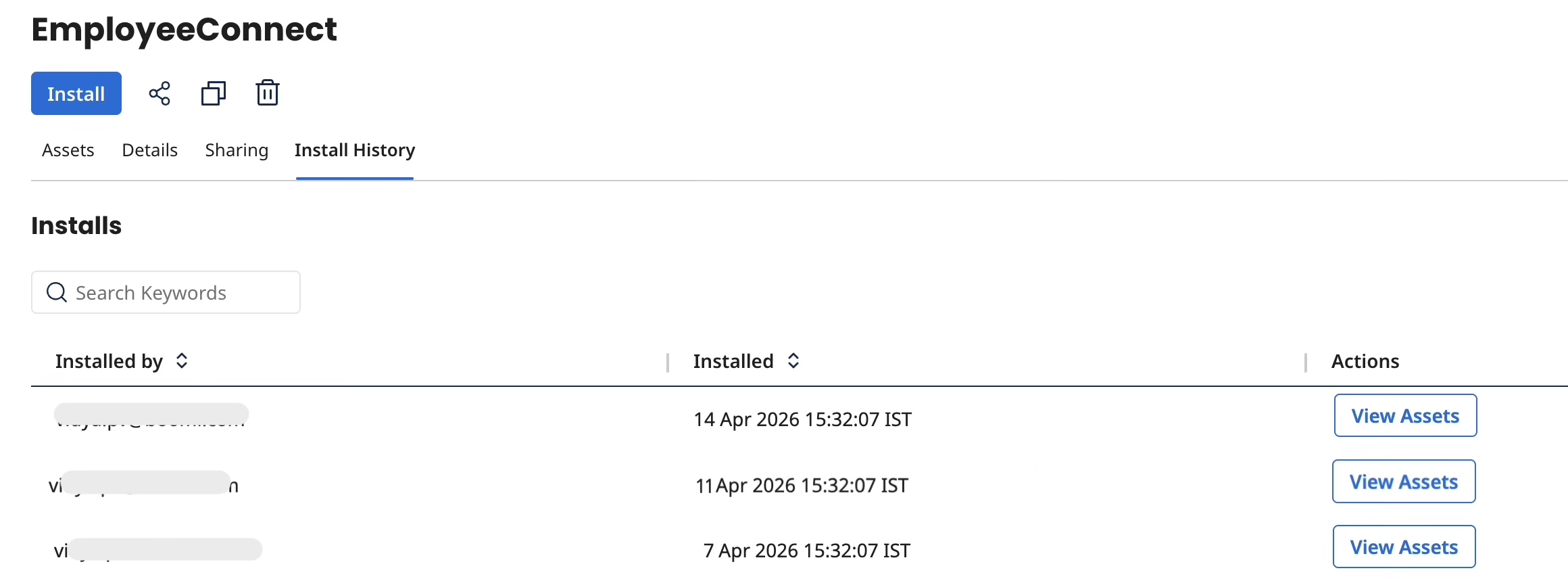
To access the installation history of a Bundle:
- Navigate to the details page of a Bundle.
- Go to the Install History tab. A list of all installs of this particular Bundle is displayed. This list includes the details of the user(who has installed), the time of installation, and the list of assets available in this Bundle.
- You can also search from the list of installed Bundles by the Bundle name.
- Click View Assets. The side pane displaying the list of assets opens.
- In the side pane, click the View install location icon to open the asset in its respective application. For more information on viewing assets, refer to Viewing assets in a Bundle.
note
- To view data in the Install History tab, you must have at least one installed asset or Bundle.
- To navigate to an installed asset's location, you must have access to that particular application, and the asset must still exist in the account.
