Local Edition Pre-installation Checklist
Overview
Ensure that all requirements and dependencies have been resolved before starting installation.
Synopsis
This is a planning step and this document provides a step-by-step guide for the preparatory steps before proceeding to actual cluster setup.
This step depends on the Local Edition images that you need to create and uses the toolkit pod for some activities. Refer to Building Images for more information.
Before proceeding with actual cluster setup, ensure that you have all the necessary resources such as database credentials in the form of K8s secrets and the necessary access permissions available.
You may need the following expertise to complete the prerequisites:
-
Network Administrator: To create Certs, Open Ports in firewalls, and Network settings like timeouts, packet sizes.
-
K8S Administrator: Ability to create service accounts, namespaces, Kubernetes management (topology constraints, toleration), HA/DR posture within a region and across regions, pod management providing resources such as CPU and memory allocating limits, and scaling them.
-
Database Administrator (DBA): Create database and users, secure database connections with clients, add timezone information, client connection management including read, write, and connection timeouts, HA/DR posture for database by using replication within a region or across regions. A region is a location of a physical data center.
-
Full-Stack Observability Administrator: Select your full-stack observability software such as OpenSearch, Elastic Search, or Splunk. The stack administrator must build the cluster and size the storage based on your queries per second, create users, and create indexes.
-
IT Administrator: - Email services, LDAP or SSO integration.
-
DevOps: To install, manage, monitor, and upgrade Local Edition.
Refer to Prerequisites for a complete list of required software and services.
Check Required Accesses
Ideally, no escalated privileges are required for provisioning the Local Edition cluster and sudo access is rarely needed.
-
In case of cloud deployments:
-
You can sign in to the cloud provider.
-
You are signed-in to the cloud provider using the cloud provider CLI such as
googlesdk,azurecli, orawscli
-
-
You have a
Kubeconfigfile providing required access to the Kubernetes cluster and this config file is in a path that Helm can access.-
The
Kubeconfigfile can be passed to Helm commands as--kubeconfig. -
The
Kubeconfigis available asKUBECONFIGenvironment variable. -
The
Kubeconfigfile is accessible at$HOME.
-
Kubernetes and OpenShift Versions and Capabilities
Kubernetes version
kubectl version
Client Version: v1.28.2
Kustomize Version: v5.0.4-0.20230601165947-6ce0bf390ce3
Server Version: v1.28.3-gke.1286000
OpenShift version
$ oc version
Client Version: 4.14.11
Kustomize Version: v5.0.1
Server Version: 4.14.11
Kubernetes Version: v1.27.10+28ed2d7
Verify Kubernetes cluster
Compare the output of Cluster information. Enabling metrics is useful when troubleshooting issues with the cluster or Local Edition deployment.
$ kubectl cluster-info
Kubernetes control plane is running at https://104.154.231.140
GLBCDefaultBackend is running at https://104.154.231.140/api/v1/namespaces/kube-system/services/default-http-backend:http/proxy
KubeDNS is running at https://104.154.231.140/api/v1/namespaces/kube-system/services/kube-dns:dns/proxy
Metrics-server is running at https://104.154.231.140/api/v1/namespaces/kube-system/services/https:metrics-server:/proxy
Kubernetes Cluster Nodes
Use the following command:
$ kubectl get nodes -o wide
Verify that the required namespace is usable
Typically applications are deployed in a different namespace instead of the default one. Ensure that the namespace is usable.
The namespace is important since all Kuberenetes entities for Local Edition(created by user or Helm) are created in this namespace.
ON AKS, the default namespace cannot be used to deploy applications. Ensure that you have created the required namespace. The namespace must be provided as Helm values.
List namespace
$ kubectl get namespace

NAME              STATUS   AGE
default           Active   15d
<name space you have created>
Verify the current kubectl config has the correct namespace in the current context.
$ kubectl config view --minify | grep namespace
namespace: default or <namespace you have created>
Check Helm
Verify Helm installation. Run the following command:
$ helm version
Expected output is similar to
version.BuildInfo{Version:"v3.11.2", GitCommit:"912ebc1cd10d38d340f048efaf0abda047c3468e", GitTreeState:"clean", GoVersion:"go1.20.2"}
Check Helm environment.
$ helm env
HELM\_BIN="helm"
HELM\_BURST\_LIMIT="100"
HELM\_CACHE\_HOME="/<user-home>/.cache/helm"
HELM\_CONFIG\_HOME="/<user-home>/.config/helm"
HELM\_DATA\_HOME="/<user-home>/.local/share/helm"
HELM\_DEBUG="false"
HELM\_KUBEAPISERVER=""
HELM\_KUBEASGROUPS=""
HELM\_KUBEASUSER=""
HELM\_KUBECAFILE=""
HELM\_KUBECONTEXT=""
HELM\_KUBEINSECURE\_SKIP\_TLS\_VERIFY="false"
HELM\_KUBETLS\_SERVER\_NAME=""
HELM\_KUBETOKEN=""
HELM\_MAX\_HISTORY="10"
HELM\_NAMESPACE="default"
HELM\_PLUGINS="/<user-home>/.local/share/helm/plugins"
HELM\_REGISTRY\_CONFIG="/<user-home>/.config/helm/registry/config.json"
HELM\_REPOSITORY\_CACHE="/<user-home>/.cache/helm/repository"
HELM\_REPOSITORY\_CONFIG="/<user-home>/.config/helm/repositories.yaml"
Customizing IDs and Keys for Local Edition (introduced in v6.1.0)
This section was added in the Boomi Cloud API Management – Local Edition (LE) 6.1.0 release.
In Boomi Cloud API Management - Local Edition, the Config UI communicates with the Platform API using a secure API call.
The following 3 attributes define the security of each API call:
- Area UUID
- Package key
- Package key secret
Before you begin the installation, for untethered mode you must generate a new Area UUID and a new pair of Package key and secret. In tethered mode, do not generate a new Area UUID; instead, use the Area UUID from Boomi Cloud API Management. You can find the Area UUID by signing into Boomi Cloud API Management.
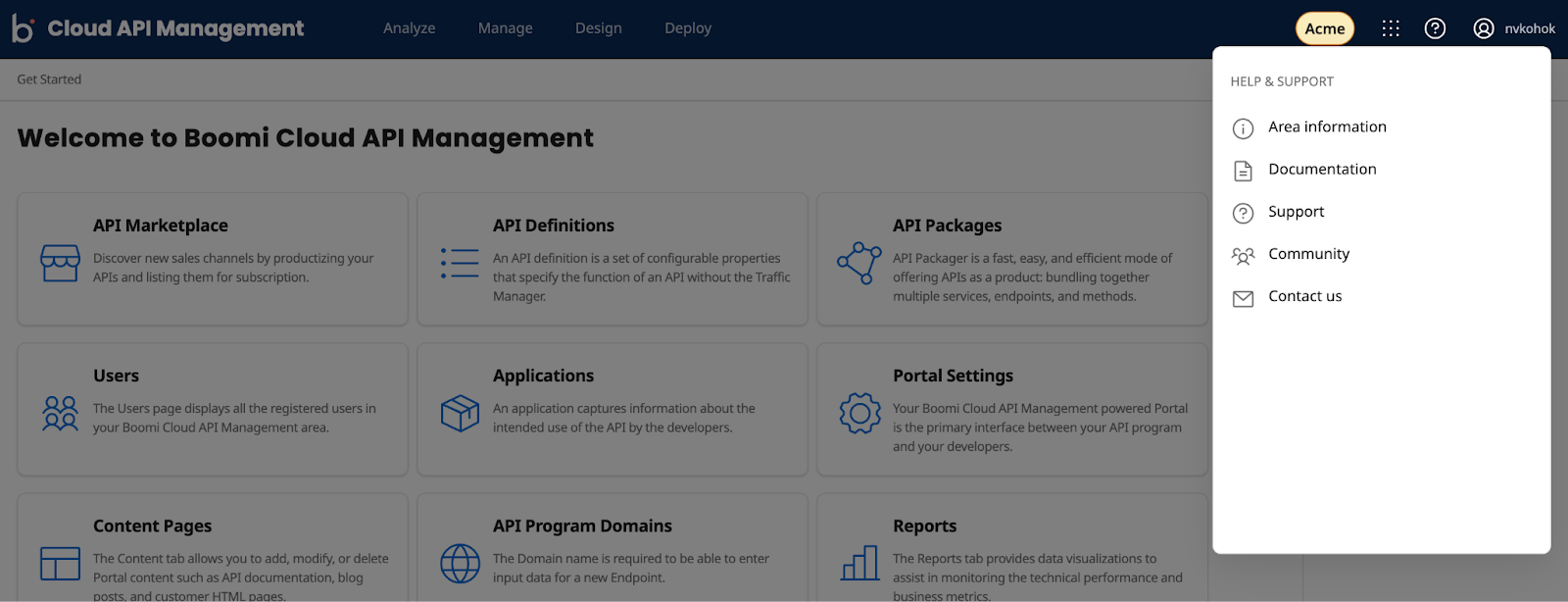
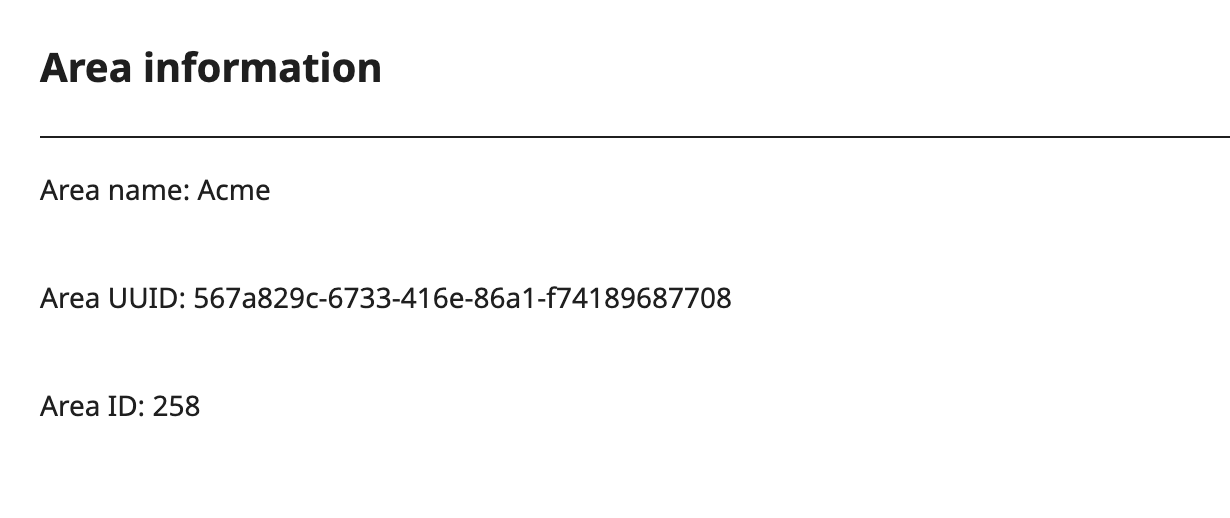
The following sections provide more details on how to generate Area UUID, Package Key, and Package Key Secret.
Using customize.sh
You can run customize.sh from any location.
Basic command
<extract location>/scripts/customize.sh -h

Boomi Cloud API Management - Local Edition 6.1.0

Usage: customize.sh [-u] [-k] [-s] [-b] [-h]
-u  = Generate custom Area UUID
-k  = Generate custom package key
-s  = Generate custom package key secret
-b  = bare output. First is area UUID, second line is API key and third line is API secret. Default is labelled output
-h  = this help message
Use the output from this script in helm values and secrets for the pre-install job. Refer to install guide for more details
Generate Area UUID
<extract location>/scripts/customize.sh -u
Generating Customized values for Boomi Cloud API Management - Local Edition 6.1.0
Generate Area UUID       	? YES
Generate Package key     	? NO
Generate Package key secret  ? NO
Display bare (without labels)? NO
Work dir                 	: <extract location>/scripts
Custom Area UUID       	: 2B67B1F9-4E5D-48D7-8341-D357B2F52FE4
Generate Package Key
<extract location>/scripts/customize.sh -k
Generating Customized values for Boomi Cloud API Management - Local Edition 6.1.0
Generate Area UUID       	? NO
Generate Package key     	? YES
Generate Package key secret  ? NO
Display bare (without labels)? NO
Work dir                 	: <extract location>/scripts
Custom Package key     	: h6quaxf5a9xxba8jsygpjyzn
Generate Package key secret
<extract location>/scripts/customize.sh -s
Generating Customized values for Boomi Cloud API Management - Local Edition 6.1.0
Generate Area UUID       	? NO
Generate Package key     	? NO
Generate Package key secret  ? YES
Display bare (without labels)? NO
Work dir                 	: <extract location>/scripts
Custom Package key secret  : 7TCM7XT99v
If you are using CI/CD pipelines to deploy Boomi Cloud API Management - Local Edition, use the bare option (-b) along with other parameters.
Generate bare output
Area UUID
<extract location>/scripts/customize.sh -ub
ACC33DE4-0319-47CC-BFA3-9C6B8AD0DAB
Package key
<extract location>/scripts/customize.sh -kb
sgsmvckkwcxmyp7zqbnw4kxc
Package key secret
<extract location>/scripts/customize.sh -sb
m4NAn9QvaR
