Design and Implementation
Sequence Diagram
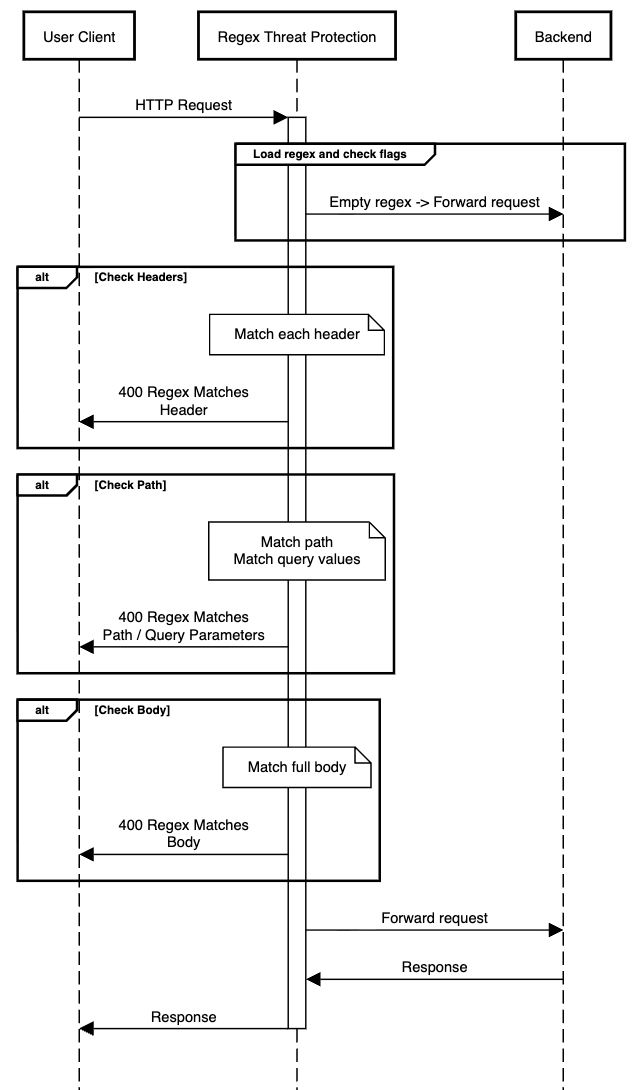
The following diagram illustrates the request flow when the Regex Threat Protection policy is configured on an API endpoint.
Implementation Details
The policy processes each inbound request through the following steps:
-
The policy loads the configured regular expression pattern (
regex) and the inspection scope flags (checkHeaders,checkPath,checkBody). If theregexvalue is empty or not configured, no matching occurs, and all requests are forwarded to the backend. -
If
checkHeadersistrue, each request header name and value is matched against the regex pattern. In the first match, the request is rejected with a400 Regex Matches Header. -
If
checkPathistrue, the URL path (URL-decoded) and each query parameter value (URL-decoded) are matched against the pattern. On a path match, the request is rejected with the400 Regex Matches Patherror. When a query parameter matches, the request is rejected with the400 Regex Matches Query Parameterserror. Query parameter keys are not decoded. -
If
checkBodyistrue, the full request body is matched against the pattern. On a match, the request is rejected with400 Regex Matches Body. -
Evaluation stops at the first match found. If no match is found across all enabled checks, the request is forwarded to the backend.
-
Matching uses Java
Matcher.matches(), which requires the entire evaluated string to match the pattern. Wrap patterns with.*to detect substrings within longer strings.
Full-string Vs. Sub-string Matching
The policy uses Matcher.matches(), so the entire string being evaluated must match the pattern from start to end. This is equivalent to anchoring the pattern with ^ and $. The following table illustrates the difference:
| Pattern | Input | Result | Explanation |
|---|---|---|---|
SELECT | SELECT | Match | The entire string equals the pattern. |
SELECT | DROP; SELECT * FROM users | No match | Pattern does not span the full string. |
.*SELECT.* | DROP; SELECT * FROM users | Match | .* allows SELECT anywhere in the string. |
| `.*(?i)(SELECT | DROP).*` | drop table users | Match |
Error Messages
When the policy detects a structural violation, it rejects the request immediately with 400 status code and the corresponding status message.
| Code | HTTP status message | Reason |
|---|---|---|
| 400 | Regex Matches Header | A request header name or value matched the configured regex. |
| 400 | Regex Matches Path | The URL path matched the configured regex. |
| 400 | Regex Matches Query Parameters | A query parameter value matched the configured regex. |
| 400 | Regex Matches Body | The request body matched the configured regex. |
