Design and Implementation
Sequence Diagram
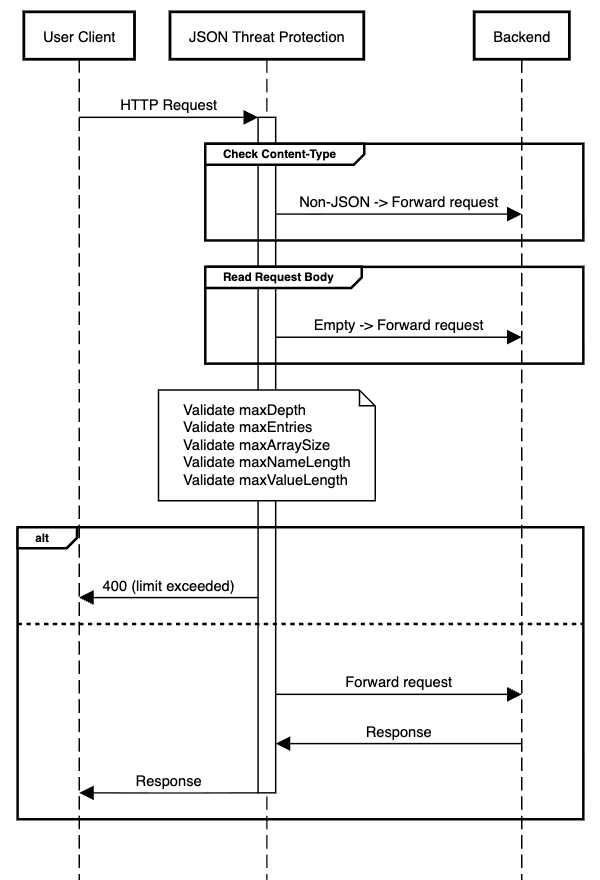
The following diagram illustrates the request flow when the JSON Threat Protection policy is configured on an API endpoint.
Implementation Details
The policy processes each inbound request through the following steps:
-
The policy inspects the
Content-Typerequest header (application/json,text/json, or any type ending in+json). If the content type is not JSON-compatible (for example,text/xmlortext/plain), the request is forwarded to the backend. -
The policy reads the full request body. If the body is empty or absent, it treats it as valid and forwards it to the backend.
-
The policy parses the JSON body and validates it against the configured structural limits -
maxDepth,maxEntries,maxArraySize,maxNameLength,maxValueLength. -
If any configured limit is exceeded, the request is immediately rejected with an
400status code and message identifying the violated constraint. For example,Max JSON Depth Exceeded. -
If a configuration value is invalid or non-numeric, the default value is used to prevent requests from being blocked caused by misconfiguration.
-
If all checks pass, the request is forwarded to the backend.
Error Messages
When the policy detects a structural violation, it rejects the request immediately with a 400 status code and the corresponding status message.
| Code | HTTP status message | Reason |
|---|---|---|
| 400 | Invalid JSON Data | The request body is not valid JSON. |
| 400 | Max JSON Depth Exceeded | The configured maxDepth limit has been exceeded. |
| 400 | Max JSON Entries Exceeded | The configured maxEntries limit has been exceeded. |
| 400 | Max JSON Array Size Exceeded | The configured maxArraySize limit has been exceeded. |
| 400 | Max JSON Field Name Size Exceeded | The configured maxNameLength limit has been exceeded. |
| 400 | Max JSON Field Value Size Exceeded | The configured maxValueLength limit has been exceeded. |
