Resolving profile type conflicts in an API Service component
Resolve profile type conflicts on the Profiles tab of an API Service component.
About this task
You should not deploy API Service components that specify objects for which a profile type conflict exists. A conflict occurs when multiple referenced XML profiles include the same type and namespace or when multiple referenced JSON profiles have the same root name. You can resolve a conflict by standardizing on one profile:
Procedure
-
In the API Service component, select the Profiles tab.
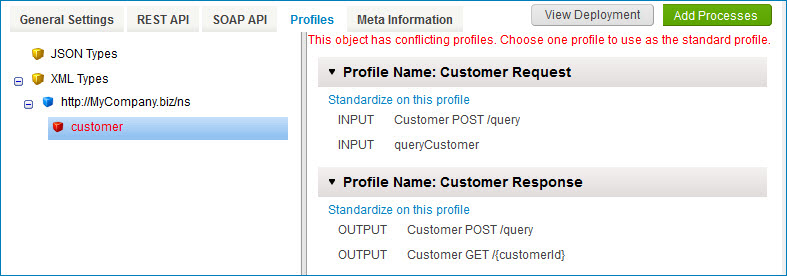
In the objects list, a profile type conflict exists for each object highlighted in red.
-
Select an object for which a conflict exists.
For the selected object, the profiles referenced in endpoint definitions are listed.
-
For usage shown in gray, the profile is the default derived from the linked process.
-
For usage shown in black, the profile is configured as an override.
-
-
Choose the profile on which to standardize and click its Standardize on this profile link.
-
In the confirmation dialog, click OK.
Endpoint definitions are updated to reference that profile, thereby resolving the conflict
-
Repeat steps 2–4 for each additional object for which a conflict exists.
-
Click Save or Save and Close.
