API Proxy Server tab
The Server tab lets you configure server settings for an API Proxy component.
To learn more about a field on the API Proxy Configuration - Server tab, click the (i) information icon next to it.
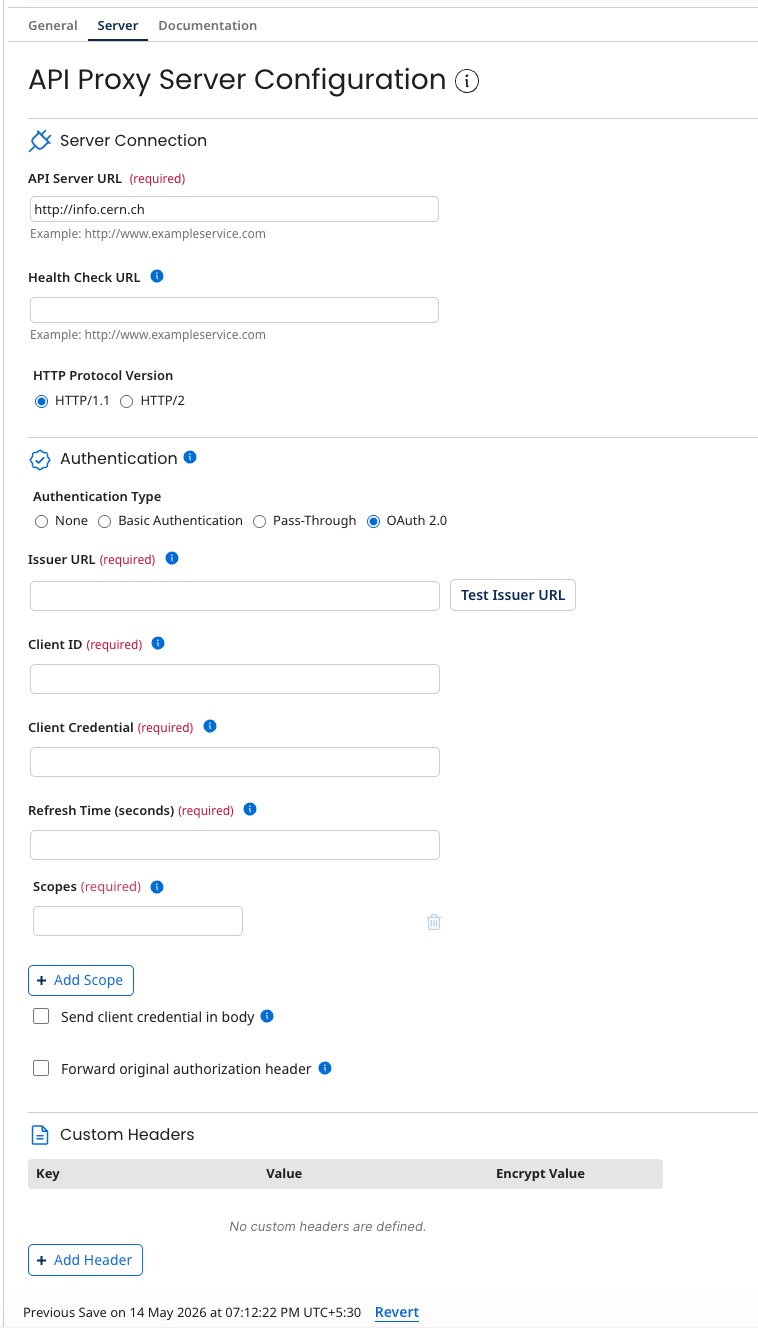
Server connection
API Server URL
The URL to which the API Gateway sends API service requests. If you import a Swagger specification file into the component and select the API\_URL field for importing, that field’s value appears here.
Health Check URL
The URL to which API service heath checks can be sent. An HTTP 200 \(OK\) response indicates that the server hosting the API service is operating normally.
HTTP protocol version
The API proxies support the HTTP/2 protocol, which enhances the efficiency of API communications. By default, the system operates on HTTP/1 until HTTP/2 is explicitly enabled. This capability allows API proxies to use the benefits of HTTP/2, resulting in improved response times and reduced latency for API calls.
Authentication
Authentication Type The type of authentication used on the server that hosts the API service. The following types are available:
-
None - No authentication applies.
-
Basic Authentication - Selecting this authentication type reveals the required User Name and Password fields.
-
Pass-Through - The Gateway passes the original authorization header to the target endpoint.
-
OAuth 2.0 - The Gateway acquires a Bearer token from your identity provider using the client credentials grant type and injects it into the Authorization header of each outgoing request. Selecting this authentication type reveals the following fields:
Field Description Issuer URL URL of the identity provider. Click Test Issuer URL to validate the URL before saving. If the URL is invalid, the message "The url that you entered is invalid" appears below the field. Client ID The client identifier for OAuth authentication. Client Credential The client secret for the client created in your identity provider. Refresh Time (seconds) The interval, in seconds, at which the Gateway refreshes the access token. Set this value to match or be less than the token expiration configured at the identity provider. Scopes One or more scopes that determine the actions and resources accessible through third parties in the client credential flow. You must include at least one scope. Click + Add Scope to add a scope or the delete icon to remove one.
Send client credential in body
By default, credentials are sent as an authorization header. Enable this option only if your identity provider requires credentials in the request body.
Forward original authorization header
If selected, the Gateway forwards the original authorization header in the X-Forwarded-Authorization header.
Custom headers
Lists custom headers included by the API Gateway in API service requests. Each custom header consists of a key and value. You can encrypt the value in a custom header.
-
Clicking Add Header enables the addition of a custom header.
-
While adding a custom header, clicking Encrypt enables the Password for an encrypted value to be set.
-
Clicking the Trash icon in the Remove column for a listed custom header removes that custom header.
