Authentication in API Management
Authentication in Boomi API Management ensures that only verified consumers can access a published API. You manage this at the Gateway level through Authentication Sources, which bridge your Gateway and an Identity Provider (IdP).
Boomi supports two primary methods for securing your Gateway endpoints:
Boomi recommends using the OAuth2.0 framework with OpenID for authenticating standard external users, leveraging JWT at the API Gateway. This approach provides flexibility, as it primarily requires a token that the configured authentication source can validate, enabling the adoption of alternative flows beyond the traditional authorization code flow.
For system-to-system communication, Mutual TLS with Client Certificate Authentication may be a preferable option. For quick prototyping or internal API use cases, you can use Basic Authentication (username/password) via the Gateway, allowing API execution authentication alongside Developer Portal sign-in.
Authentication sources
The Configure Server > Authentication link in the API Management menu opens the Authentication Sources page.
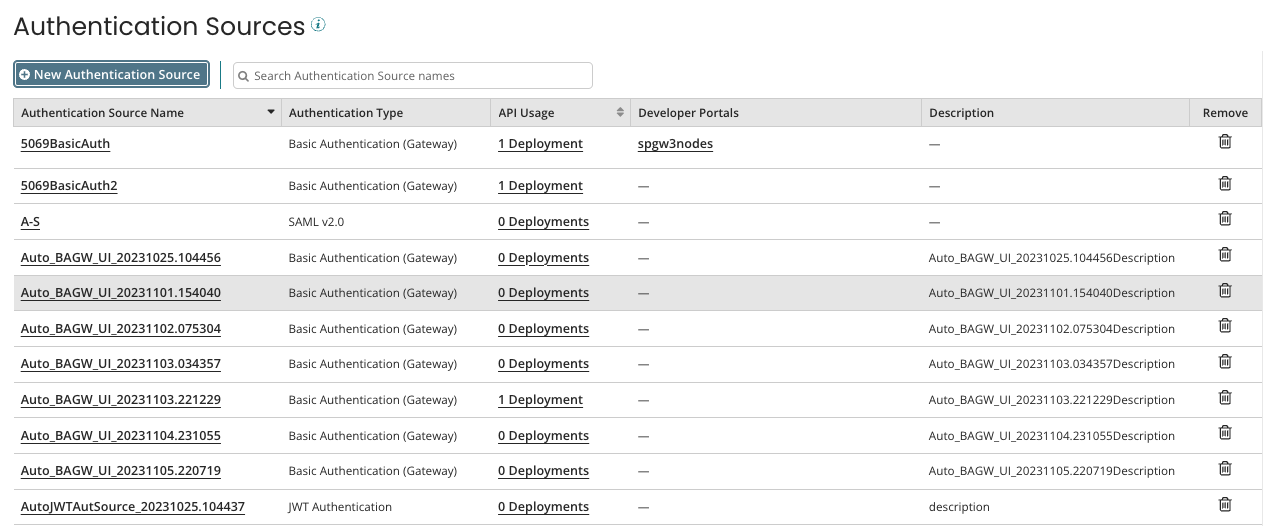
This page allows you to add and manage authentication sources for your APIs. You can view existing configurations, monitor their usage, or remove those no longer required.
Each source provides the following details:
-
Authentication Source Name: Name of the authentication source.
-
Authentication Type: The authentication provider.
-
API Usage: Number of deployments using the authentication source.
-
Developer Portals: Developer portals using the authentication source.
-
Description: General description about the authentication source.
-
Remove: Delete authentication sources that are not in use.
You cannot delete an authentication source that any deployments use or that serves as the sign-in authentication source for any developer portal.
Refer to Adding a Basic Authentication Source and Adding a JWT Authentication Source for detailed configuration steps.
